Ascripto Review: Email Signature Management That Starts With a Free Audit
Ascripto review: a free signature audit, directory-synced signatures for Gmail and Outlook, banner campaigns, and plans from $0.75 a person a month.
On this page
Most email signature tools sell you templates. Ascripto starts by showing you how far your team's signatures have already drifted, and it does that for free, before it changes anything.
Disclosure: this is a paid review. LaunchIt was paid to write it, and links to ascripto.com on this page are marked as sponsored.
Category: Email Signature Management · Works with: Google Workspace, Microsoft 365 · Website: ascripto.com
Email signatures look like the smallest problem a company can have, until you read a few of yours side by side. An old logo here, a job title from two promotions ago there, a disclaimer that only half the company carries. Nobody decided it should be this way. It just drifts.
Ascripto is built around that drift, and what makes it worth a closer look is how plainly it talks about what it can and cannot do.
A note on how I reviewed it. Ascripto is a tool for company administrators, so you need a work account on a Google Workspace or Microsoft 365 business domain to get in. I signed in with our own launchit.fast Google Workspace account, created a workspace and looked around the app. I stopped before connecting our directory and allowing signature access, so I have not seen a live audit of real signatures or deployed one. For those parts I went through the pricing page and Ascripto's setup and technical guides, and where a judgement depends on running it at full scale, I say so.
What Ascripto is
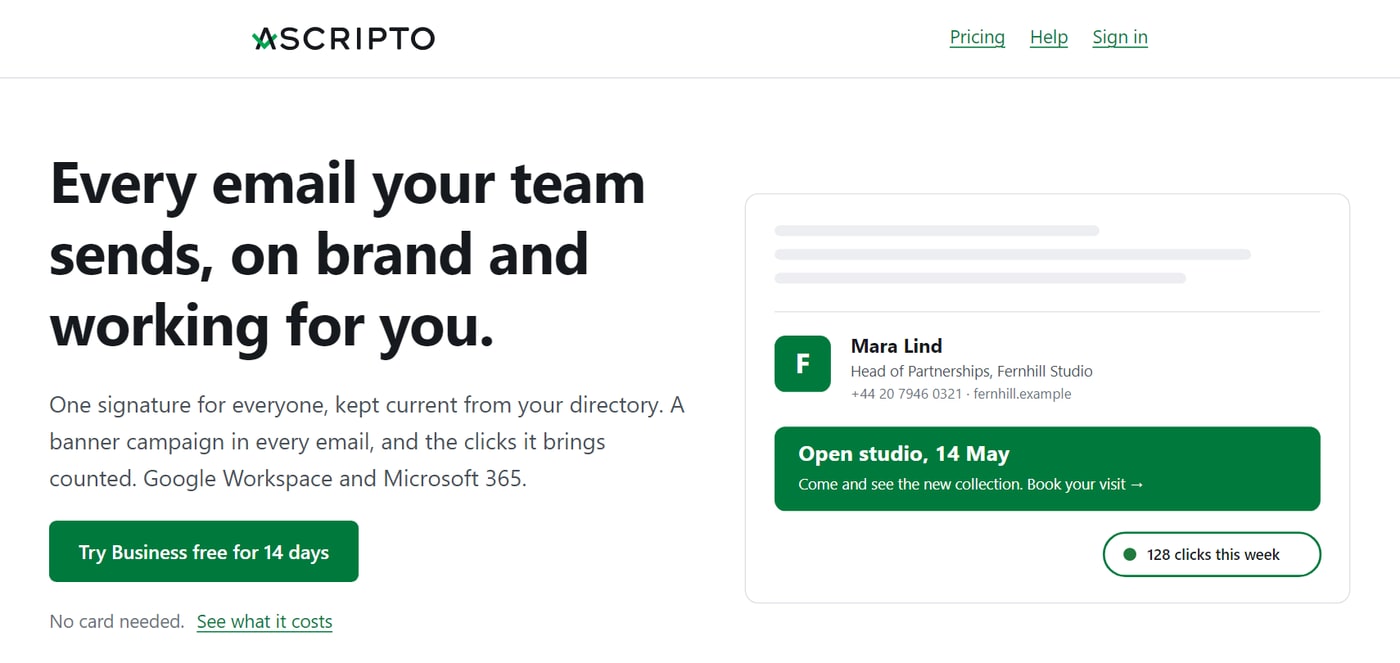
Ascripto is an email signature manager for companies on Google Workspace or Microsoft 365. It pulls each person's details from your company directory, puts a consistent signature in their mail, and shows you who has gone off-brand. It is built by Gyrus Solutions, and provided from Kraków, Poland.
The team's background explains a lot of the product. They describe a decade spent working in the mail path, the part of email infrastructure where mistakes mean messages do not arrive, and their view of this category is refreshingly unglamorous:
Email signature management looks like a design problem and is mostly a deliverability and platform-integration problem.
Their about page goes further than most. It names the statistics this category likes to repeat, such as a 34,000% return on signature marketing, says those numbers come from companies selling signature marketing, and declines to use them. In a market that runs on inflated claims, that is a good sign of who you are dealing with.
It starts with an audit, not a template
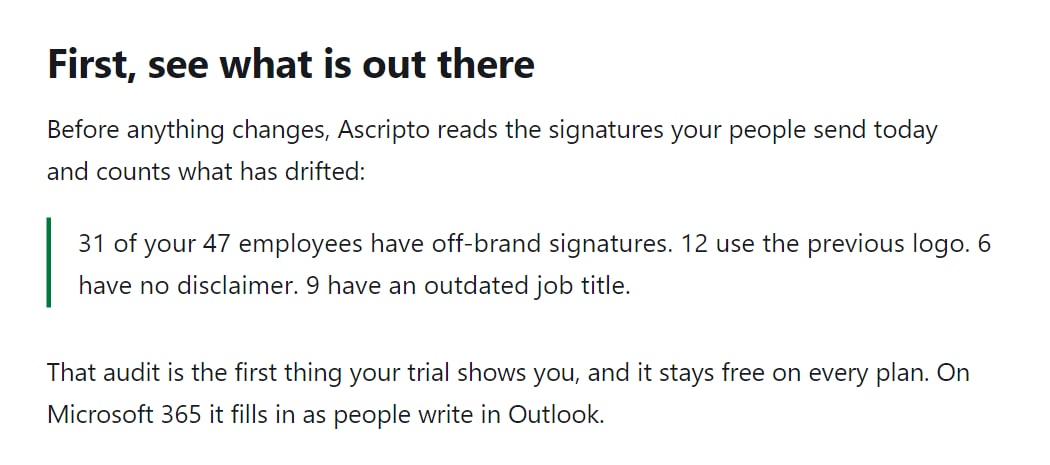
This is the feature I would lead with too. Before anything changes, Ascripto reads the signatures your people actually send and counts what has drifted. The example on its homepage is a good picture of a normal company: 31 of 47 employees off-brand, 12 on the previous logo, 6 with no disclaimer, 9 with an outdated job title.
According to the Google Workspace guide, the audit breaks the result into one row per cause: no signature at all, no name, a missing job title or work phone, no logo. Each row links to exactly those people, next to what the directory says should be there. It runs by itself once a day, and a mailbox it could not open is shown apart rather than counted against anybody, which is the careful kind of detail I like to see.
Two things make this a smart first step. It is free at any size, on every plan, so a 500-person company can see the size of its problem before paying anything. And it changes nothing: on Google Workspace the audit only reads, and nothing is written until you choose to deploy.
The guide is also upfront about the limits. The audit watches the signature Gmail uses for new messages. It does not see a separate reply signature or one set inside the Gmail mobile app, and it does not judge fonts, sizes or colours. On Microsoft 365 there is no server-side way to read an Outlook signature, so the audit fills in through an add-in as people write.
One signature, kept current by your directory
Inside the app, the sidebar is short: Home, Signatures, Campaigns, People, Assets and Settings. The Signatures screen shows how the product thinks. Each signature is a row with an order, a name, who gets it and how many people that is, with Design and Clicks links beside it. Ours started with a single Default signature for "Everyone else", so a company can begin with one design and add others for particular groups later.
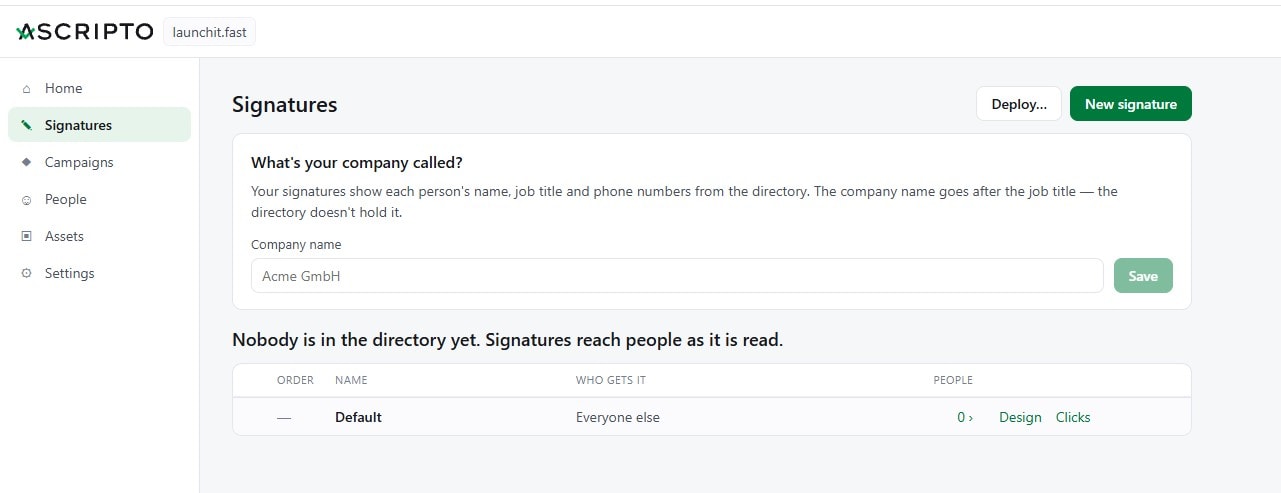
Its first question was what our company is called, because the name goes after the job title and the directory does not hold it. It is a small thing, but it shows someone thought about what a directory actually contains. The rest comes from there: names, job titles and phone numbers arrive straight from Google Workspace or Microsoft 365. When someone's title changes, their signature follows within minutes, with nobody filing a ticket.
On Google Workspace, Google tells Ascripto about each directory change as it happens, and the whole directory is read every hour as well. On Microsoft 365, changes are read every minute and the whole directory once a day. A signature builder, a mailbox import and a preview for everyone are free on every plan, so you can see the result for each person before it reaches anyone.
That Google detail matters more than it sounds. Ascripto's Google Workspace guide explains why the built-in option falls short: the Admin console footer cannot use directory fields, so it cannot print the sender's name or title, and it is added beneath whatever the person already has, which is where double signatures come from. Ascripto writes the real Gmail signature instead, so it reaches the web and the Gmail mobile apps with nothing installed.
Setting it up
Getting in was quick. I signed in with our Workspace account and landed on a screen titled "Set up Ascripto for launchit.fast", with three steps in plain words: connect your directory (read-only), allow signature access (one setting in the Google Admin console), and see your audit, described as "Free, and nothing is changed". You accept the terms and the Data Processing Agreement on behalf of the company, and click Create workspace.
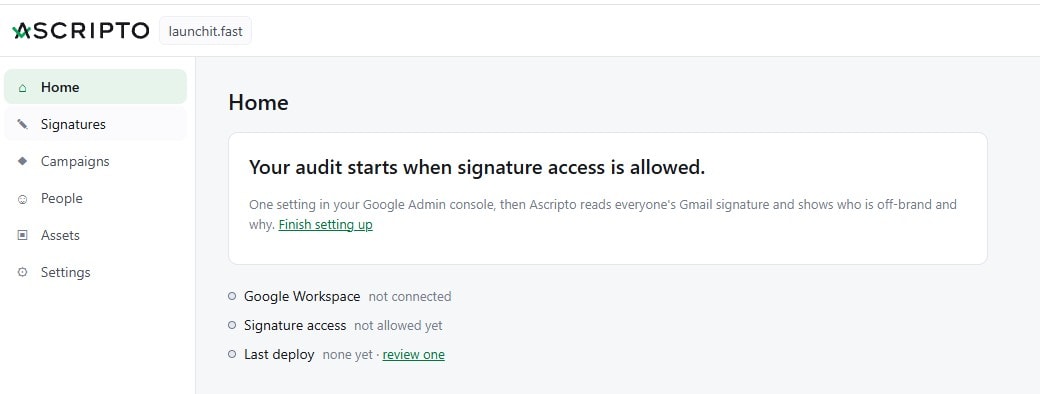
Home then tells you exactly where you stand: Google Workspace not connected, signature access not allowed yet, no deploy so far, and one clear line, "Your audit starts when signature access is allowed", with a link to finish setting up.
One line surprised me. An optional question asks whether you are a natural person running a business, because Polish law gives such customers extra protection, and it adds that you never have to answer and nothing depends on it. You do not usually see that on a B2B sign-up, and it fits the tone of everything else here.
The setup guides are some of the clearest I have read for an admin tool. They say who you need, how long it takes, exactly what is accessed, and what to do when something refuses.
Google Workspace takes about ten minutes of your time, plus one setting a super admin makes once. You sign in with your work account, connect the directory (read-only), and allow signature access in the Google Admin console. If you are not a super admin, a Copy these steps button gives you the exact instructions to send to one, and they do not need an Ascripto account.
Microsoft 365 takes about fifteen minutes. An administrator connects the directory and deploys the Outlook add-in once from the admin center. Nobody installs anything themselves. Ascripto notes that the add-in can take up to a day to reach everyone, because that is how Microsoft rolls these out. Microsoft verified Ascripto as a publisher on 30 October 2026, so the consent screen shows the verified badge.
Then there is the relay, and this is where the mail background shows. For Microsoft 365, Ascripto offers two ways to sign mail. The add-in sets the signature as people write. The relay signs every message on its way out, whatever app sent it. Your mail goes out through Exchange Online, passes through Ascripto and comes straight back, with incoming mail untouched and your MX records unchanged. Many companies will want both, and recipients still get exactly one signature.
What I like is that the relay is optional and clearly described as a decision for you to make. Ascripto says plainly that it will not require a mail-flow change just to get started.
If you are on Microsoft 365, the timing matters
Ascripto has published a useful guide to the EWS retirement. By its account, Microsoft is switching off Exchange Web Services in phases from October 2026 to April 2027, and Microsoft Graph, the recommended replacement, has no way to manage signatures. So any signature tool built on EWS has to move to a different mechanism altogether. Ascripto's add-in and relay do not depend on EWS. If your current tool does, its timeline is worth an hour of your IT team's time. It also pushes back on content that treats this as a single-day deadline, which is the opposite of what a vendor with something to sell usually does.
A campaign in every email
Every company sends thousands of emails that nobody treats as a marketing channel. On the Business plan, Ascripto puts a banner under everyone's signature for a launch, an event or an offer: for the people you choose, from the day you choose, gone when it ends.
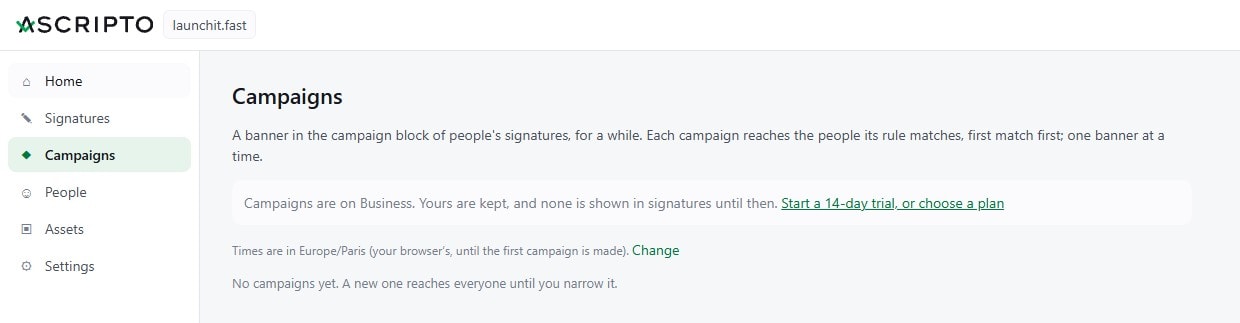
The Campaigns screen explains its own rules in a sentence: each campaign reaches the people its rule matches, first match first, one banner at a time, and a new one reaches everyone until you narrow it. Times follow your own time zone, which you can change. On Free the screen is there, but it tells you campaigns are a Business feature: any you make are kept, and none appears in signatures until you are on that plan.
Every link in a signature is counted, with clicks per campaign and, if you want them, per person, over 7, 30 and 90 days. You choose whether to measure individuals at all, which is a sensible default for a tool used by colleagues. Every version of a signature is also kept, and one click takes you back to any of them, so a mistake in a rollout is a small event rather than a long afternoon.
In keeping with the rest of the site, Ascripto makes no promises about what a banner will earn you. It counts the clicks and leaves the conclusion to you.
For agencies and MSPs
If you look after IT for several small companies, there is a partner program worth knowing about. You get one dashboard across clients that puts the ones needing attention first, a library of your own designs that take on each client's logo and colours, setup links for the steps only a client's own administrator can take, and one invoice a month at 25% off the partner prices. Your own workspace is free, and each client keeps ownership of its workspace and can see everything you did in it.
Pricing
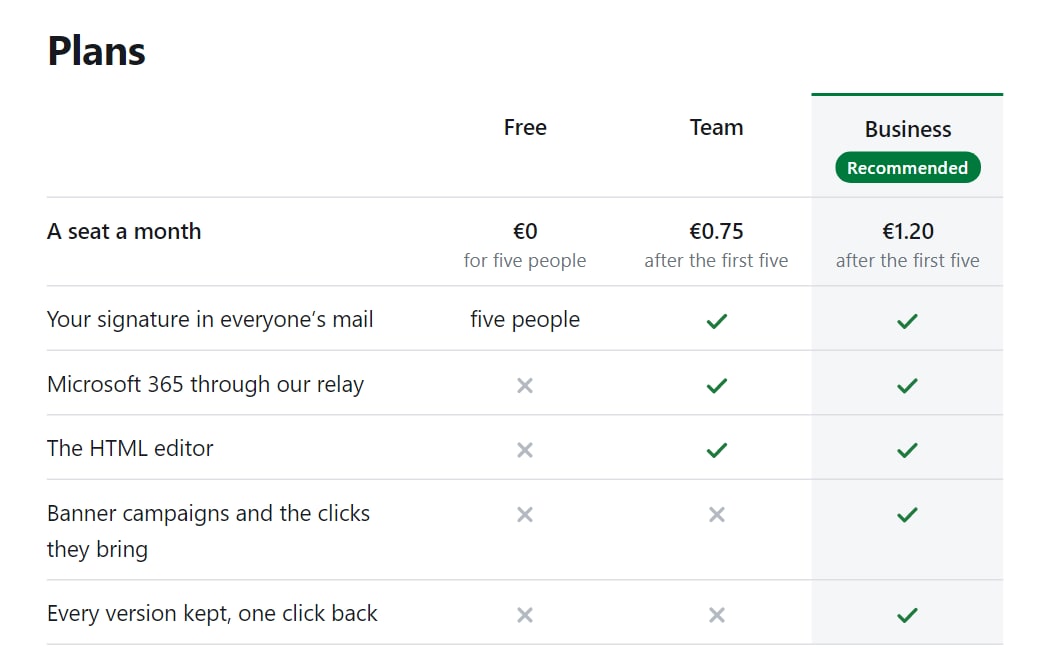
The pricing is unusually simple. The first five people are free on every plan. After that, Team costs 0.75 a person a month and Business 1.20, in euros or dollars, before VAT. Above 50 seats, each band gets cheaper. A paid plan costs at least 5 a month, and there is no annual contract. Business also has a 14-day free trial with no card, and if you add no payment method the workspace simply returns to Free.
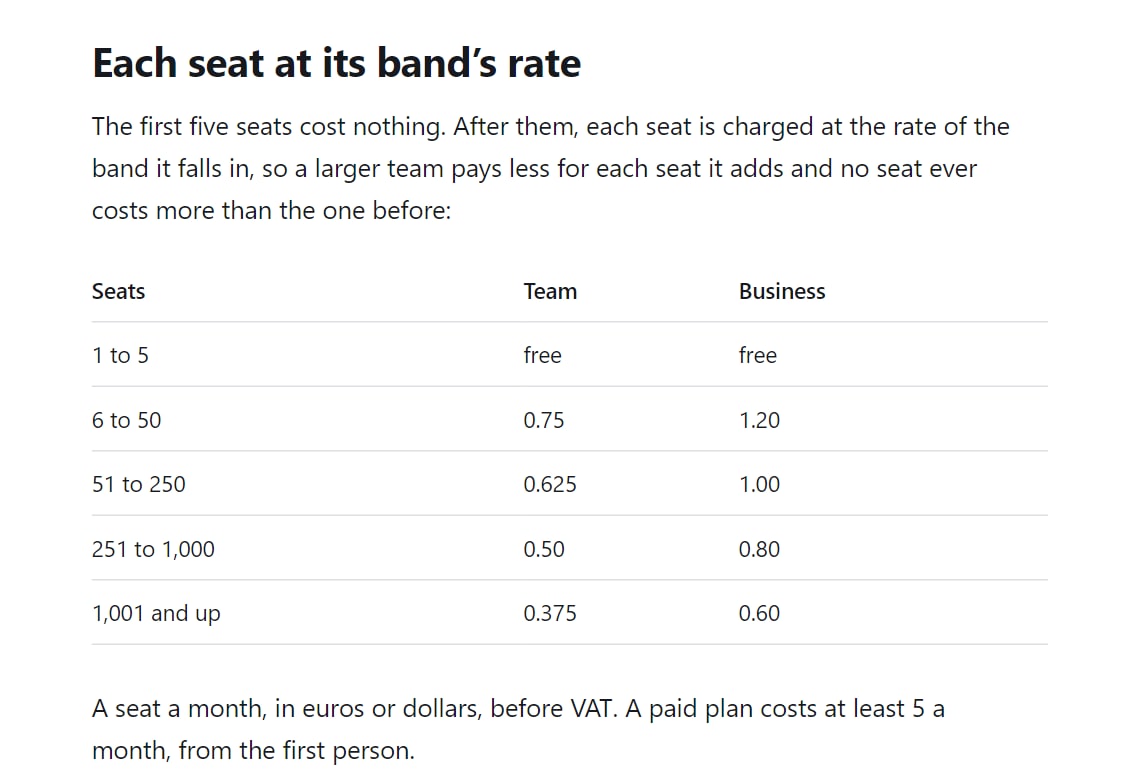
Three details stood out to me:
- You pay for people who actually got a signature. Leavers, people you never deployed to and shared mailboxes nobody sends from cost nothing.
- You pay after the month, not before. Your first charge comes a month after the plan starts, and cancelling can never strand a prepaid period.
- Your price stays yours. When Ascripto publishes a new price list, the plan you hold keeps its rates for as long as you keep it, and the terms promise it.
Here is how that compares with the entry plans of some established tools, using the prices each vendor published on 1 November 2026:
| Tool | Entry price, per person a month | Cost for 100 people a month | Minimum | Free option |
|---|---|---|---|---|
| Ascripto Team | $0.75 after the first 5 | $65 | None ($5 a month minimum charge) | Free for 5 people; 14-day Business trial, no card |
| Exclaimer Starter | $0.90, billed annually | $90 | 10 users | 14-day trial |
| Signitic | €1 | €100 | 20 licenses | Free plan, with a Signitic badge |
| CodeTwo Email Signatures 365 | $1.22 at 10 users | $111 yearly, $123 monthly | 10 licenses | 14-day trial, no card |
| WiseStamp Basic | $19 a month plus $1 a person, billed annually | $119 | Not stated | Not compared |
Plans are not like for like, so read this as a rough guide. The fairer comparison for campaigns is Ascripto Business at $104 for 100 people: it includes banners and click counts, where Exclaimer lists banners from Standard ($145) and engagement data on Pro ($175). Those vendors have been around for years and have broader feature lists. Ascripto's advantage is a simple price with no minimum and no annual billing.
What to know before you sign up
A few things worth setting expectations around, because I would rather you hear them from me than discover them yourself.
You need a company domain and an administrator. A personal Gmail or Outlook address will not work. Signing in with our Workspace account took moments, but seeing your audit takes more: a Workspace administrator and a super admin, who may be the same person. If that person is not you, plan for one short conversation with IT.
Google's signature permission is broad by design. Google has no read-only version of it, so allowing the audit also technically allows updates, even though the audit only reads. Ascripto states that it never reads, sends or deletes mail on Google Workspace, and the grant can be removed at any time from the same Admin console page.
The relay sits in your outgoing mail. Ascripto says message content is handled in transit and not stored, and a log keeps the sender, recipients, Message-ID, time and outcome. Each paid seat adds 1,000 messages a month to a shared pool of at least 5,000, and going past it costs 0.25 per 1,000. Gmail and the Outlook add-in have no such limit, because mail never passes through Ascripto on those routes.
Outlook coverage is still growing. The Microsoft 365 guide says Outlook on the web and Outlook for iOS are measured, while the other Outlook apps are being tested. If your company lives in desktop Outlook, check where that stands during your trial.
People can still edit their own Gmail signature. Ascripto does not lock it. If someone changes theirs, the audit tells you.
It is young. Microsoft publisher verification only arrived in late October 2026. On the other side, you get a team that publishes dated guides and answers at a real address.
The verdict
Ascripto is the rare tool in its category that sounds like it was written by the people who run the servers. It starts with a free audit that shows you the size of your problem, it keeps signatures current from the directory you already maintain, and it tells you in plain words what it cannot see.
The pricing suits smaller teams particularly well. There is no minimum, no annual contract and a free plan that actually deploys, so a five-person company pays nothing and a 25-person company pays €15 to €24 a month.
If you run IT or marketing at a company on Google Workspace, the audit is close to a no-brainer: it costs nothing and tells you something you probably do not know. If you are on Microsoft 365, especially with an EWS-based tool in place, it deserves a place on your shortlist right now.
Website: ascripto.com · On LaunchIt: Ascripto listing
Frequently asked questions
Is Ascripto free?
Partly. The first five people are free on every plan, so a team of five or fewer can use it for nothing. The signature audit, the signature builder and a preview for everyone are free at any size. Business also has a 14-day free trial with no card.
How much does Ascripto cost?
After the first five people, Team costs 0.75 a person a month and Business 1.20, in euros or dollars, before VAT. Seats get cheaper above 50. A paid plan costs at least 5 a month. For 25 people that is 15 a month on Team or 24 on Business, and for 100 people 65 or 104.
Does Ascripto work with personal Gmail or Outlook accounts?
No. It is built for companies on Google Workspace or Microsoft 365, and it needs a work account at your company's domain plus an administrator to connect the directory.
Do I have to route my email through Ascripto?
No. On Google Workspace your mail never passes through Ascripto, because the signature is written into Gmail itself. On Microsoft 365 the Outlook add-in works the same way, and the relay, which signs every message on its way out, is an optional extra on paid plans.
Can Ascripto read my emails?
On Google Workspace, Ascripto says it never reads, sends or deletes mail. It only works with signature settings. On Microsoft 365, if you switch on the relay, messages pass through it to be signed. Ascripto says their content is handled in transit and not stored, and a log keeps the sender, recipients, Message-ID, time and outcome.
What does the signature audit check?
It compares the signatures people actually send with your directory and shows who has no signature, or is missing a name, job title, work phone or logo. It does not judge fonts, sizes or colours, and on Google Workspace it does not see separate reply signatures or ones set in the Gmail mobile app.
Will Ascripto keep working after Exchange Web Services is retired?
Ascripto's Microsoft 365 setup uses an Outlook add-in and an outbound relay rather than EWS. Its own guide says EWS is being switched off in phases between October 2026 and April 2027, and that Microsoft Graph cannot manage signatures, which is why it uses those two routes.
Who makes Ascripto?
Gyrus Solutions, a team with a background in email infrastructure. The service is provided by Andrii Koptiukh Software Developer in Kraków, Poland.
Free tools mentioned in this article
No account, no credit card. Built for founders doing their own SEO.
Ask AI about this article
Open your assistant with the article preloaded: key takeaways and next steps.