

FlowLister Review: An AI eBay Lister That Turns Your Photos Into Listings
FlowLister review: an AI eBay lister that writes the title, item specifics, price and shipping from your photos. How it works, pricing and alternatives.
On this page

Every eBay seller knows the real bottleneck is not finding stock, it is listing it. FlowLister, built by a full-time eBay seller, takes a handful of phone photos and hands back a complete eBay listing: title, item specifics, condition notes, price and shipping, ready for you to check and publish.
Disclosure: this is a paid review. LaunchIt was paid to write it, and links to flowlister.com on this page are marked as sponsored.
Category: AI eBay listing tool · Works on: the web and an iPhone app · Website: flowlister.com
Ask anyone who resells on eBay what they would happily never do again, and listing is near the top. Writing a title that fits 80 characters and still says everything a buyer searches for. Filling a dozen item specifics. Looking up what the same item actually sold for. Guessing the parcel size. For a single item that is easily 15 to 20 minutes, and for a pile of thrift finds it is a whole evening.
FlowLister was built to take that job off your hands. You add photos of the item, and it writes the eBay listing for you, then waits for your review before anything goes live. Its founder, Chris Taylor, has sold on eBay since 2020 and runs a family eBay store with more than 3,800 active listings, all of them written with FlowLister. That shows in the details, as you will see below.
A note on how I reviewed it. I signed up with my LaunchIt address, and FlowLister set my account up on its Business plan for this review. I listed a pair of Sony noise-cancelling headphones from five phone photos, ran a Worth It value check, and went through the listings hub and ProofPack. I did not connect an eBay store, so I stopped at the draft stage; publishing, scheduling and crosslisting are described from FlowLister's own documentation. Plans and prices were checked on flowlister.com on 16 November 2026, and every screenshot here comes from my session.
What FlowLister is
FlowLister is an AI listing tool for eBay sellers, made by Taylor Family Software. Its pitch fits in one line from its own site: "Take a photo and FlowLister handles the rest." From your photos it writes the title, description, category, item specifics, condition notes, a suggested price and shipping, and it publishes to eBay through eBay's official API in one click, or saves the listing as a draft or schedules it for later.
It is not a generic AI writer with an eBay label on it. Chris Taylor built it because the AI listing tools he tried gave him generic titles, weak item specifics and categories that did not match the item, so FlowLister is organised around what actually goes wrong on eBay: wrong model numbers, missing sizes, careless categories and bad shipping guesses. By 31 August 2026 it had created and managed more than 38,000 listings, and 99% of the listings that sellers tried to publish or schedule went live or were scheduled.
The company is small and personal in a way that sellers clearly like. The founder answers support himself, offers a 15-minute setup call to new subscribers, and runs an hour of live Q&A on FlowLister's YouTube channel on the first and third Monday of every month. He also gives 15% of revenue to his local church and to a nonprofit that teaches teenagers practical skills, which says something about how the business is run.
The workspace
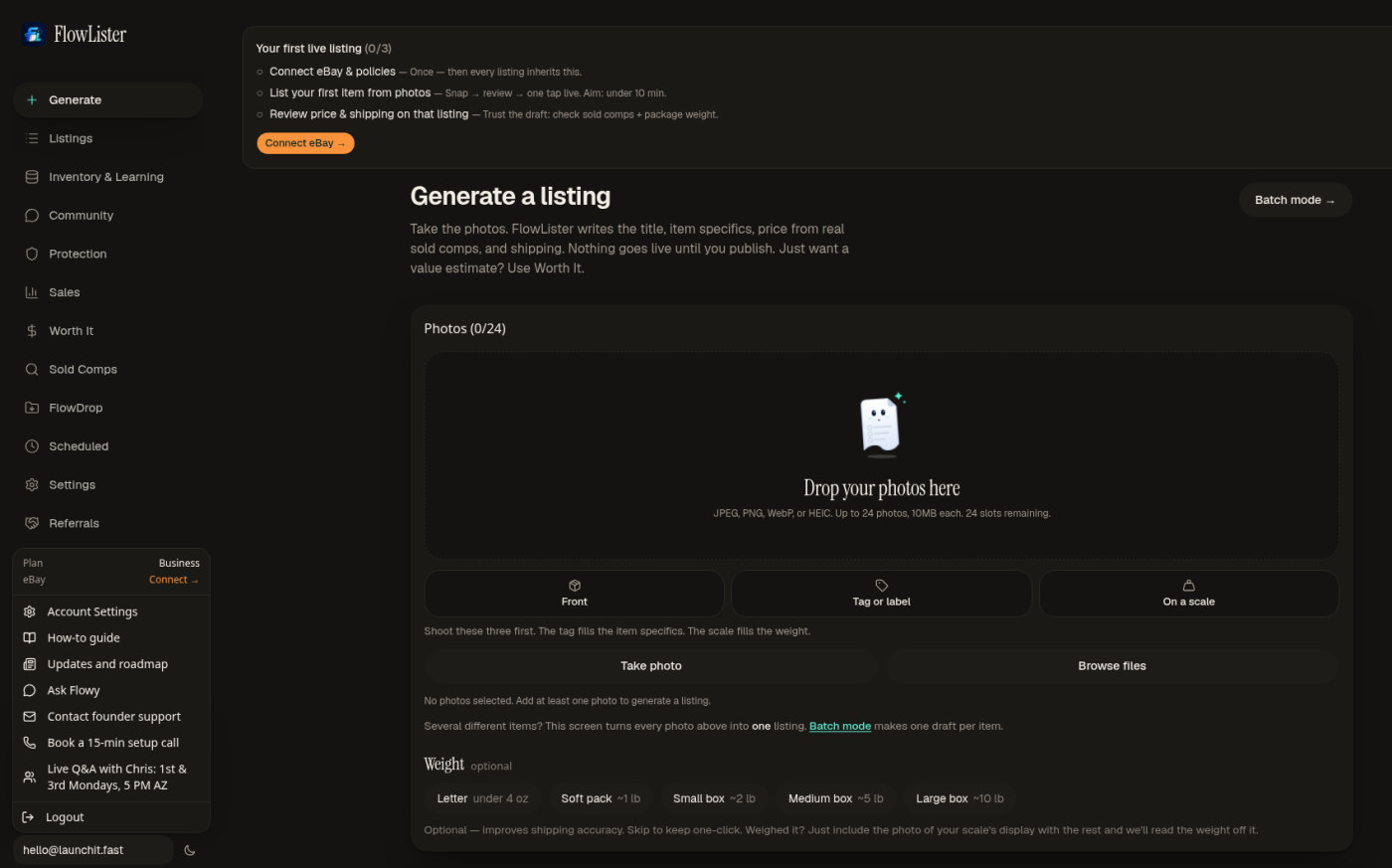
FlowLister opens straight onto the job: a page called Generate a listing, with a large box for your photos. Its promise is printed right under the heading: "Take the photos. FlowLister writes the title, item specifics, price from real sold comps, and shipping. Nothing goes live until you publish."
Above it, a short checklist walks a new seller to their first live listing in three steps: connect eBay and your business policies once, list your first item from photos, then review the price and shipping on that listing. The menu on the left shows how much more there is: listings, inventory, sales, Worth It value checks, sold comps, FlowDrop for bulk photo uploads, scheduled listings, and a Protection section for eBay returns. The account menu adds a how-to guide, a public roadmap, "Contact founder support" and that 15-minute setup call.
From photos to a listing
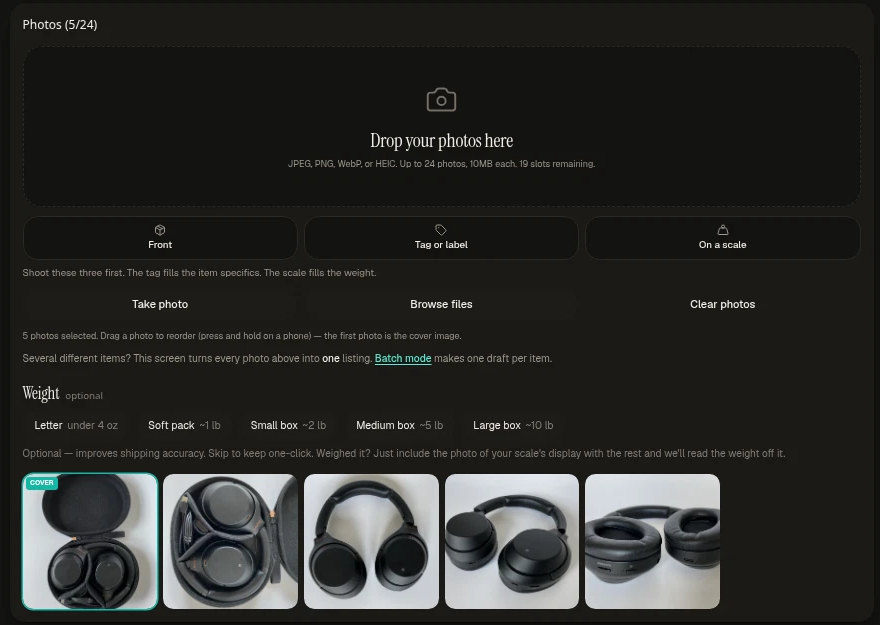
You can add up to 24 photos per item, in JPEG, PNG, WebP or HEIC, which means iPhone photos go straight in. Three buttons suggest what to shoot first, and the hint under them is the best listing advice on the page: "The tag fills the item specifics. The scale fills the weight." If you photograph the label, FlowLister reads the brand, model and size from it; if you photograph the item on a kitchen scale, it reads the weight off the display.
No scale? Pick a rough size instead: a letter, a soft pack, or a small, medium or large box. There is a box for anything the AI should know, such as a model number or a defect, and FlowLister treats what you type as fact over what it sees in the photos. You can also choose a formal or conversational tone for the description. For a pile of different items, Batch mode makes one draft per item instead of one listing from every photo.
I dropped in five photos of the headphones, in and out of their case, and clicked generate. One listing credit later, the listing was ready to review.
What it wrote
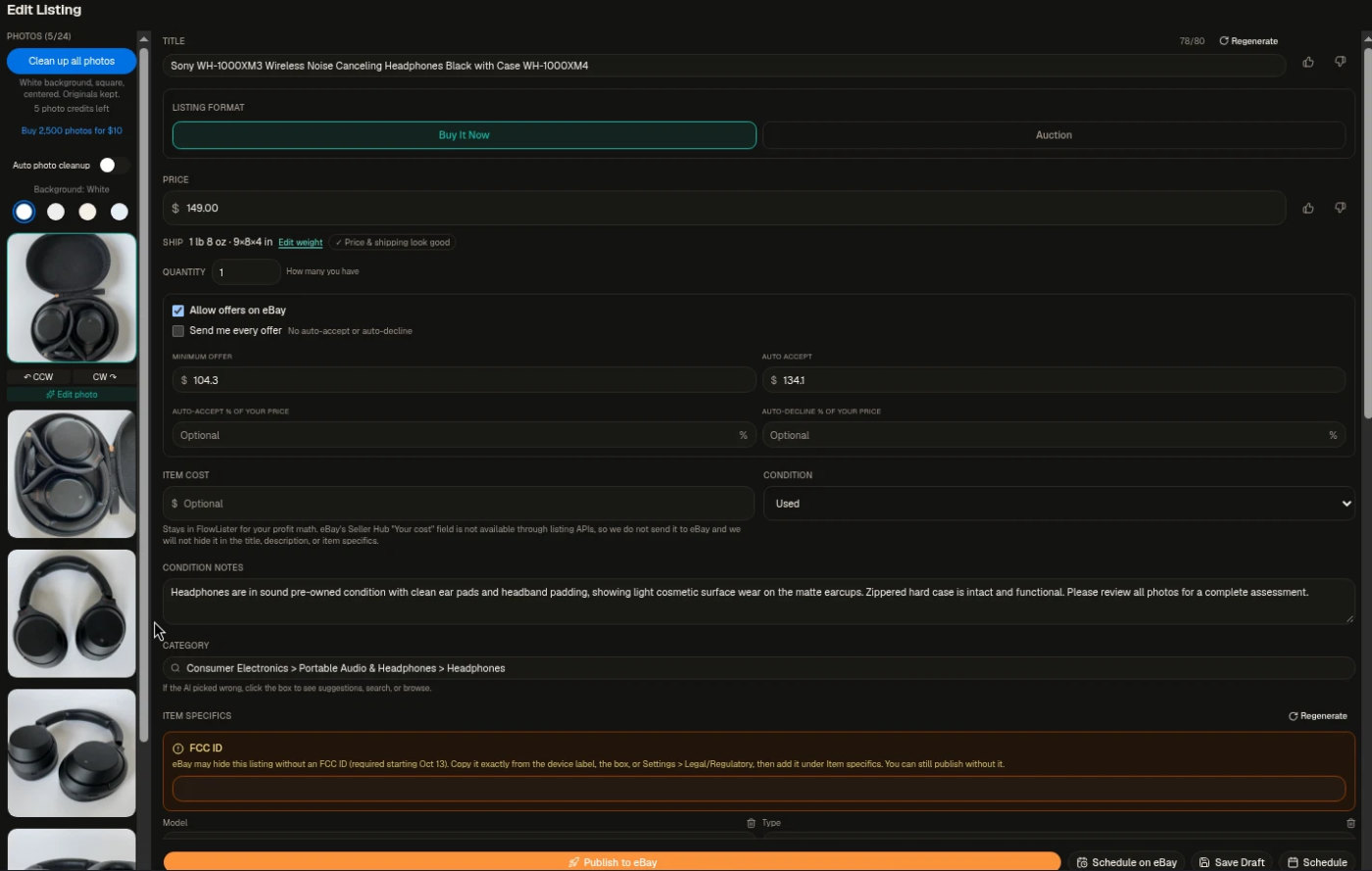
This is the screen that sells FlowLister. Every field a seller would normally type by hand was already filled in:
- Title: 78 of eBay's 80 characters, packed with brand, model, colour and "with Case", the words buyers search for.
- Format and price: Buy It Now at $149.00, with Auction one click away.
- Offers: turned on, with a minimum offer of $104.30 and automatic acceptance at $134.10, so I would not have to answer every lowball offer myself.
- Shipping: 1 lb 8 oz in a 9 × 8 × 4 inch box, with a small "Price & shipping look good" check beside it.
- Condition notes: "Headphones are in sound pre-owned condition with clean ear pads and headband padding, showing light cosmetic surface wear on the matte earcups. Zippered hard case is intact and functional." That is written from the photos, and it is exactly the honest, specific note that keeps buyers from opening returns.
- Category: Consumer Electronics › Portable Audio & Headphones › Headphones.
Thoughtful touches are everywhere. A field for what you paid for the item stays inside FlowLister for your profit maths and is never sent to eBay. Thumbs up and down buttons on the title and price let you tell the AI what you liked. You can regenerate the title or the item specifics as often as you want, because a credit is only used the first time a listing is generated, not for edits or retries. On the left, one button cleans up all the photos to a white, square, centred background, keeping the originals; that runs free in your browser on every plan.
Flowy tells you what to check

The part of FlowLister I would trust most is that it tells you what it is not sure of. Its assistant, Flowy, treats a listing as three rows (title, item specifics and price) and points you to the one that needs you, so you check a field rather than re-reading the whole listing.
My headphones got a perfect example. Under item specifics, an orange box warned that eBay may hide an electronics listing without an FCC ID, a requirement since 13 October, and explained exactly where to find it: the device label, the box, or the device's legal settings. That is precisely the kind of eBay rule a part-time seller would never hear about until a listing quietly stopped showing in search. FlowLister also checks item specifics against the values eBay allows for each category, rather than typing free text, and when the photos do not show a fact it leaves the field for you instead of guessing.
Prices from what actually sold
FlowLister's prices are built on eBay sold listings, not asking prices. When it finds sold comps for your item, the listing shows them next to the suggested price, with the range they sold in, so you can check the number yourself. The homepage examples give a feel for it: a pair of Air Jordan 3s priced at $146.75 from 20 sold comps between $50 and $275, and a Bose CD-3000 at $199 from 16 sold comps.
You choose how aggressive the pricing should be. In Settings, FlowLister calculates strategy prices from the sold comps, such as Sell Fast (below the median, to move stock quickly), Balanced, or Maximize / Accept Offers, and you pick which one becomes your default list price. Sellers outside the United States get comps from their own eBay site, in their own currency.
Publishing and scheduling
Connecting eBay takes one click in Settings and goes through eBay's own sign-in page, so FlowLister never sees your eBay password. Once connected, every listing uses your existing eBay business policies for payment, shipping and returns.
At the bottom of each listing there are four ways out: Publish to eBay in one click, Schedule on eBay for a set date and time, Save Draft to keep it in FlowLister for later (you can also save a listing to eBay as a draft), or Schedule it inside FlowLister. Scheduling is smarter than a single date: you can set a time of day, a daily cap and the spacing between listings, then schedule a whole stack of drafts at once, so a weekend of photographing becomes a steady drip of new listings through the week.
Worth It: should you buy it?
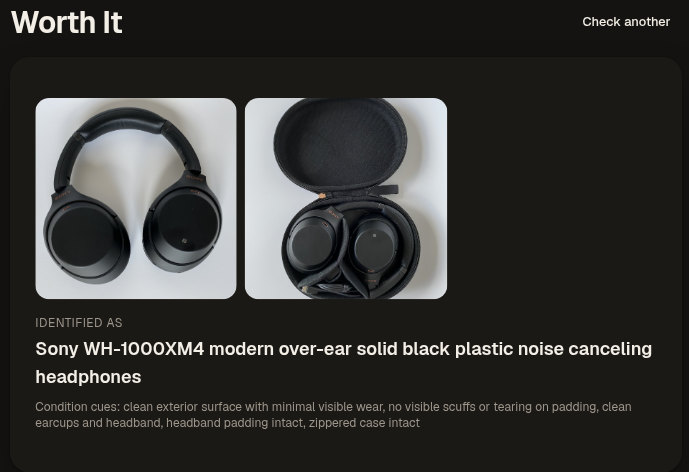
Worth It is FlowLister's tool for the moment before you buy: in a thrift store aisle, at a garage sale or clearing out a cupboard. You snap the item, and it identifies it and pulls recent eBay sold comps to give you an estimated value, a price range and a confidence score, in under 15 seconds by FlowLister's count.
From just two photos, it identified my headphones as a Sony WH-1000XM4 and listed the condition cues it could see: a clean exterior with minimal wear, no scuffs or tearing on the padding, the headband padding intact and the zippered case intact. A List this item now button turns the check straight into a listing. Every plan includes Worth It checks, from 25 a month on Starter to 800 on Big Business, and the iPhone app makes it a real in-store tool.
Your listings in one place
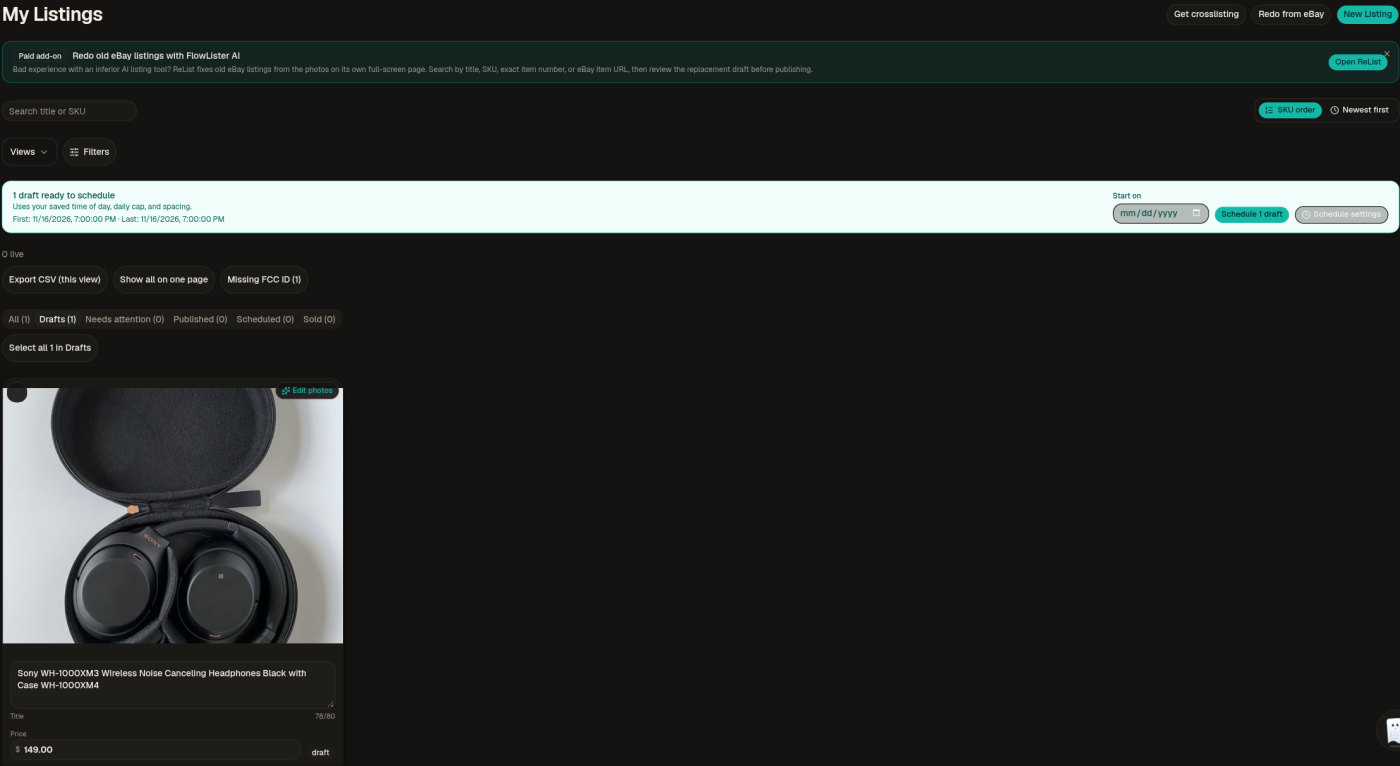
The My Listings page keeps every listing in one place, with tabs for drafts, listings that need attention, published, scheduled and sold. My headphones were waiting as a draft, with a banner offering to schedule it using my saved time of day, daily cap and spacing. Handy filters stand out: a Missing FCC ID button found the one listing that still needed it, and you can sort by SKU, search by title or SKU, and export the current view as a CSV.
Inventory management keeps your physical items separate from your listings and is included on every plan, not saved for the expensive ones. Two buttons at the top lead to the add-ons: Redo from eBay, which rebuilds your old eBay listings from their own photos, and Get crosslisting.
ProofPack: protection against returns
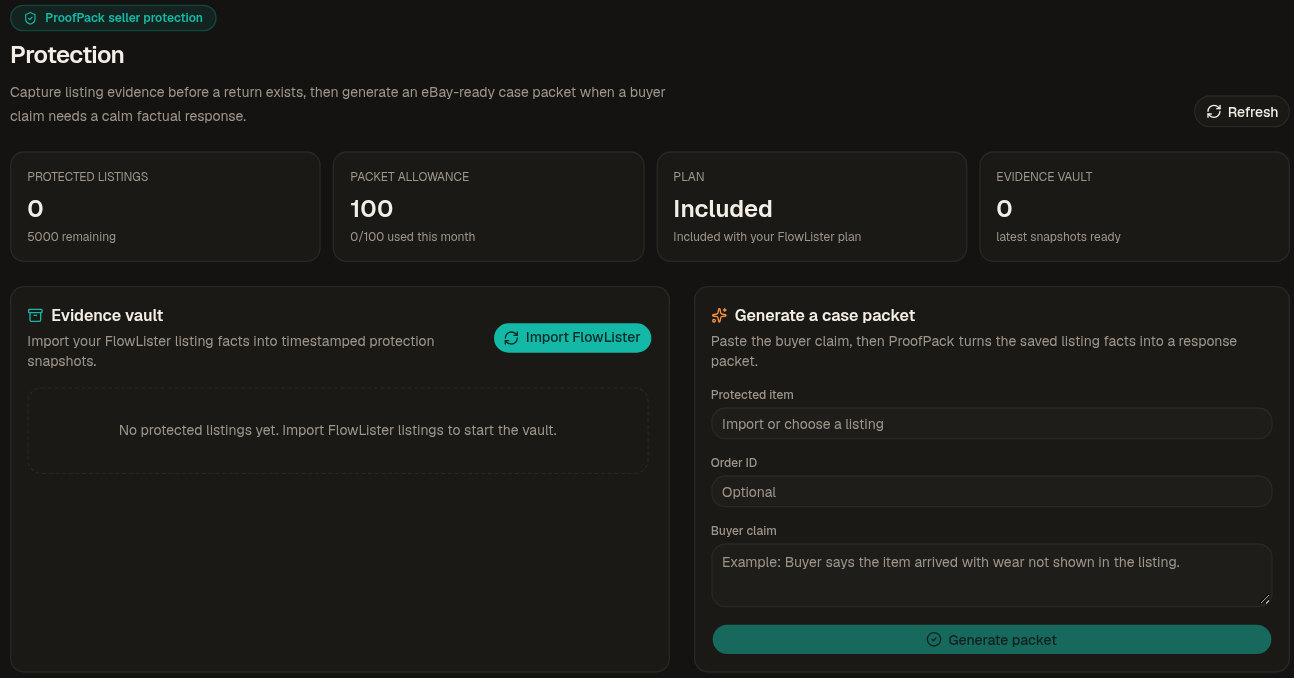
ProofPack is the feature I did not expect in a listing tool, and one I would want as a seller. It saves a timestamped snapshot of each listing while the facts are fresh: the title, photos, condition notes, item specifics, price and policies. If a buyer later claims the item was not as described, you pick the protected listing, paste in the buyer's words, and ProofPack builds a case packet with the listing facts, a paste-ready response for eBay, a draft message to the buyer and an HTML or PDF copy.
It does not promise to win a case, and says so. What it gives you is an organised record made before memory, edits and stress blur it. It is included free on every plan, with room for 5,000 protected listings and 100 case packets a month.
More tools for busy sellers
- FlowDrop (beta): drop a whole folder of photos from a sourcing haul, and FlowLister sorts them into items, reads your scale and SKU stickers, and makes a listing for each one.
- Crosslisting (add-on): posts your eBay listings to Poshmark and Mercari from your own Chrome browser, and to Depop item by item on the lifetime option. FlowLister never holds your passwords for those sites: it works through the browser session you already have open. When an item sells on Poshmark, it ends the eBay listing so you never sell the same item twice, 80 times out of 80 since 27 September by its own count. Its crosslisting explainer is worth reading before you turn it on: it is unusually candid about how crosslisting tools work with each marketplace.
- Buyer message auto-reply (opt-in): answers eBay buyers' questions about size, measurements, shipping, condition and offers in your own writing style. It never touches returns or disputes, and it stays off until you turn it on.
- eBay ReList (add-on): rebuilds old, tired eBay listings from their photos, keeps your SKUs where eBay returns them, skips duplicates and ends the original just before the new one goes live.
- VA plans: one login can run up to 100 client eBay accounts, and clients connect their own eBay, so you never need their passwords.
- iPhone app: list and run Worth It checks from your phone, with the same account.
Pricing
FlowLister has four plans, and they differ only in volume, not in features: every plan gets the full photo-to-listing workflow, sold-comp pricing, batch generation, scheduled publishing, one-click eBay publishing, inventory management and ProofPack. These were the prices on 16 November 2026, month to month in US dollars:
| Plan | Price | Listings a month | Cost per listing | Worth It checks a month | Extra listings |
|---|---|---|---|---|---|
| Starter | $19.99 a month | 95 | About $0.21 | 25 | $0.25 each |
| Pro | $49.99 a month | 375 | About $0.13 | 100 | $0.20 each |
| Business | $99.99 a month | 1,250 | About $0.08 | 200 | $0.15 each |
| Big Business | $399.99 a month | 5,000 | About $0.08 | 800 | $0.10 each |
New accounts start with a free 7-day trial with 3 listings to try on your own items; a card is required, and Starter begins after the trial unless you cancel. Unused listing credits roll over from month to month while you are subscribed, and extra credits come in packs of at least ten.
The optional extras are priced separately: crosslisting at $9.99 a month or $499.99 once for life, eBay ReList at $19.99 for the first 75 old-listing redos, and server photo cleanup at $10 for 2,500 photos (cleanup in your browser is free).
A simple way to choose: Starter if you list a few items most days, Pro if you list most weeks or have a backlog of a few hundred items to clear, and Business or Big Business if eBay is your main business.
How it compares
FlowLister is often weighed against crosslisting tools, which do a related but different job. Here is how it sits next to three of them, using each vendor's own pricing page on 16 November 2026 (US dollars):
| Main job | AI from your photos | Price to start | Trial | Crosslisting | |
|---|---|---|---|---|---|
| FlowLister | Writes and publishes eBay listings from photos | Title, description, category, item specifics, condition notes, price from sold comps and shipping | $19.99 a month for 95 listings | 7 days, 3 listings | Add-on: Poshmark and Mercari, Depop on the lifetime option |
| Vendoo | Crossposting and inventory across marketplaces | AI Listing Enhancement, listed among its plan features | $14.99 a month | 14 days | Yes, 10+ marketplaces |
| List Perfectly | Crosslisting with templates and bulk tools | AI Listing Assistant: 25 a month on Simple, more on higher plans | $29 a month | Money-back guarantee listed | Yes, all its marketplaces |
| Nifty | Marketplace automation (sharing, relisting, offers) and crosslisting | AI listing generation on Crosslisting plans | $22 a month for one marketplace's automation; Crosslisting Plus $35.99 | 7 days | Yes, on Crosslisting plans |
Read it as a map rather than a scorecard. Vendoo, List Perfectly and Nifty are at their best moving listings you already have between marketplaces and keeping them in sync. FlowLister starts one step earlier, at the photo, and puts its effort into making the eBay listing itself right: specifics eBay accepts, prices from sold comps, shipping, and flags like the FCC ID before you publish. If eBay is your main channel and writing listings is what slows you down, that is exactly the job you want done well, and FlowLister's own crosslisting add-on covers Poshmark and Mercari when you are ready to spread out.
What to know before you sign up
- Use the trial on real stock. The 7-day trial includes 3 listings. Pick three items you actually want to sell, ideally different kinds, and judge the drafts against what you would have written.
- Decide inside the trial. Plans are month to month and you can cancel any time in Settings, keeping access and credits to the end of the period. Payments are final, so cancel before the renewal date if it is not for you.
- Shoot the tag and the scale. A photo of the label fills the item specifics, and a photo of the item on a scale gives an exact weight for shipping.
- Connect eBay first. Linking your seller account and business policies once means every listing inherits them. Selling outside the US? Choose your eBay marketplace before you connect.
- Selling electronics? Have the FCC ID handy from the label or box; FlowLister will flag any listing that needs one.
- Crosslisting runs from Chrome. Poshmark sales are checked from FlowLister's servers, and Mercari sales while Chrome is open. Read FlowLister's own crosslisting explainer first; it sets out how each marketplace works.
- Take the setup call. Subscribers who stay past the trial get a 15-minute call with the founder to set up their eBay defaults, plus the twice-monthly live Q&A.
The verdict
FlowLister does the part of eBay selling that most sellers dread, and does it with a seller's eye. From five ordinary phone photos it produced a listing I would have been happy to publish: a full-length title, a sensible price with offers set up, realistic shipping, specific condition notes and the right category. Better still, it knew what it did not know, flagging the one eBay requirement that would have hurt the listing.
The extras make it more than a writing tool. Worth It helps you buy better, scheduling turns a batch of drafts into a steady flow of new listings, and ProofPack quietly protects you against returns. All of it comes on every plan, at around 21 cents a listing on Starter and less on the bigger plans, with a founder who still answers support himself. If you sell on eBay and listing is what holds you back, FlowLister is well worth your free trial.
Try FlowLister free for 7 days
Frequently asked questions
What is FlowLister?
FlowLister is an AI eBay listing tool. You add photos of an item, and it writes the title, description, category, item specifics, condition notes, a suggested price and shipping, then publishes to eBay, saves an eBay draft or schedules the listing.
How much does FlowLister cost?
On 16 November 2026, Starter cost $19.99 a month for 95 listings, Pro $49.99 for 375, Business $99.99 for 1,250 and Big Business $399.99 for 5,000. Crosslisting, eBay ReList and server photo cleanup are optional add-ons.
Is there a free trial?
Yes. New accounts get a 7-day free trial with 3 listings. A card is required, and Starter begins after 7 days unless you cancel. There is no permanent free plan.
How does FlowLister price items?
From eBay sold listings for the same item when it finds a match, and it shows those sales next to the suggested price so you can check it. You choose a pricing strategy, from selling fast to holding out for more.
Does FlowLister publish to eBay automatically?
Only when you say so. Nothing goes live until you click Publish, schedule the listing, or save it as an eBay draft. Publishing uses eBay's official API and your own business policies.
Can FlowLister crosslist to Poshmark, Mercari or Depop?
Yes, with the crosslisting add-on at $9.99 a month or $499.99 once. It posts eBay listings to Poshmark and Mercari from your Chrome browser, and to Depop item by item on the lifetime option, and ends the eBay listing when an item sells on Poshmark. Read FlowLister's crosslisting explainer before you turn it on.
Will FlowLister get my eBay account in trouble?
FlowLister publishes through eBay's official API using your own business policies, checks item specifics against the values eBay allows, and flags requirements such as an FCC ID for electronics before you publish.
Is there a mobile app?
Yes. FlowLister AI is on the App Store for iPhone, for listing and Worth It checks on the go. On Android, the website works with your phone's camera.
Who makes FlowLister?
Chris Taylor, a full-time eBay seller since 2020, founded FlowLister in 2025. It is built by Taylor Family Software, and his family's eBay store lists with it every day.
Can I cancel at any time?
Yes. Every plan is month to month. Cancel from Settings and you keep access and your remaining credits until the end of the billing period.
Free tools mentioned in this article
No account, no credit card. Built for founders doing their own SEO.
Ask AI about this article
Open your assistant with the article preloaded: key takeaways and next steps.