
Inkwell Plot Review: Screenwriting Software With an AI Dramaturg and Version Control
Inkwell Plot review: a browser screenwriting app with an AI dramaturg, named save points, draft lines, FDX export and production tools. Features and pricing.
On this page
Most screenwriting software is still a very good typewriter. Inkwell Plot borrows from the software developer's toolbox instead: every draft saved and named, alternate versions side by side, and an AI co-writer that works inside your pages, where every change waits for your yes.
Disclosure: this is a paid review. LaunchIt was paid to write it, and links to inkwell.software on this page are marked as sponsored.
Category: Screenwriting software · Works in: any modern browser, on Windows, Mac, Linux or a Chromebook · Website: inkwell.software/plot
Ask a screenwriter where their script lives and the honest answer is usually "in several places". The treatment is in Word. The script is in Final Draft. The notes are in an email thread. The AI help, if they use any, is in a chat window they copy and paste between. And somewhere there is a folder of files called Final-FINAL-v3.fdx, with nobody quite sure which one the producer read.
Plot, from Inkwell, puts all of that in one place. You can start with an idea, grow it into an outline or a treatment, turn it into a properly formatted screenplay, revise it with an AI that reads your actual pages, and carry it all the way to a locked production script. Inkwell's Morgan Titcher sums it up in a phrase that will make sense to anyone who has watched developers work lately: Plot is "very much Cursor for writers".
A note on how I reviewed it. I created a free account, started a blank screenplay from a one-line idea and worked it into a first scene with Plot's AI, which Inkwell calls the Dramaturg. Every screenshot in this review comes from that session. For the plans, production tools and file formats, I used Inkwell's own pricing page, help center and FAQ, checked on 16 November 2026.
What Inkwell Plot is
Inkwell is the company and the platform; Plot is its screenwriting app, and it is generally available today. It handles feature films, TV episodes and stage plays, and it formats them to industry standard as you type. A second product, Canvas, brings the same tools to novels, research and other long documents, and is in early access for Pro and Team subscribers.
The idea behind it is easy to state. Software developers have had version control, side-by-side comparisons and AI that understands the structure of their code for years. Writers have had autosave and track changes. Inkwell's founding bet is that those developer tools "are more natural for writing than for code", because a screenplay is already structured: scene headings, action, characters, dialogue and transitions. Plot treats your script as exactly that, which is what lets it compare drafts scene by scene and point its AI at precisely the lines you mean.
It is built for working screenwriters, for writers' rooms and for showrunners who need to see what changed between drafts. The interface comes in English, German, Spanish, French, Japanese and Korean, and you can write, spellcheck and use the AI in American, British, Australian or Canadian English, German, Spanish, French, Japanese or Korean.
Signing up and your first project
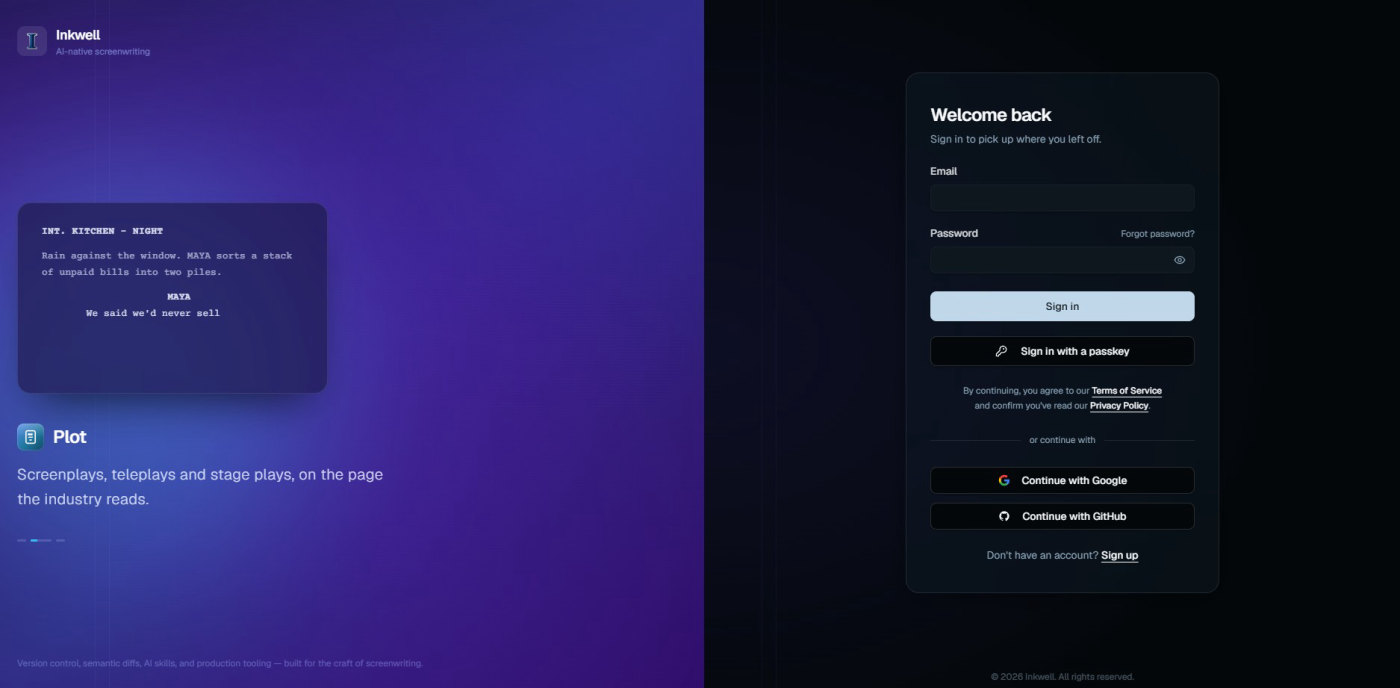
Accounts are free, and signing up takes less than a minute. You can use an email address, a passkey, or your Google or GitHub account. The sign-in page sets the tone with its tagline: "Screenplays, teleplays and stage plays, on the page the industry reads."
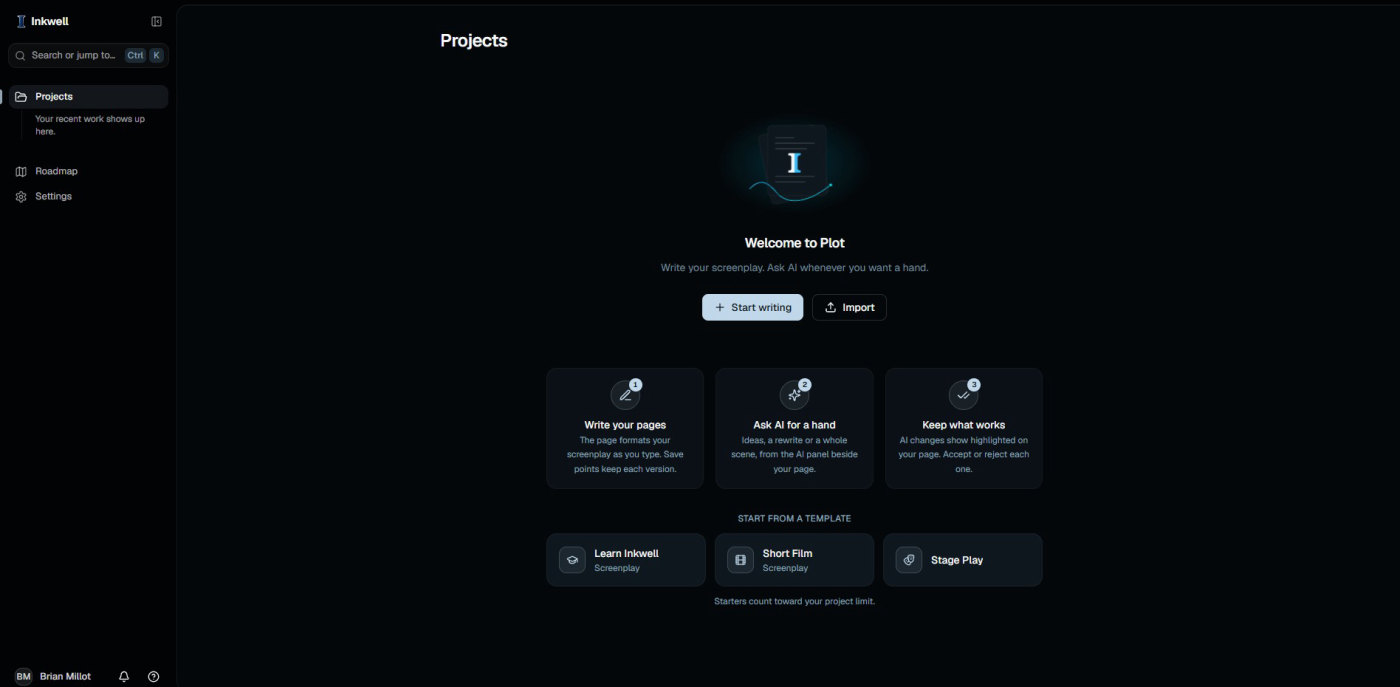
The first screen explains the whole product in three cards. Write your pages: the page formats your screenplay as you type, and save points keep each version. Ask AI for a hand: ideas, a rewrite or a whole scene, from the AI panel beside your page. Keep what works: AI changes show highlighted on your page, and you accept or reject each one.
From there you can start a blank script, import one you already have, or open a template: a Short Film, a Stage Play, or Learn Inkwell, a screenplay that teaches you the app as you read it. If you are new to Plot, that last one is the best ten minutes you can spend.
The editor: formatting you never think about
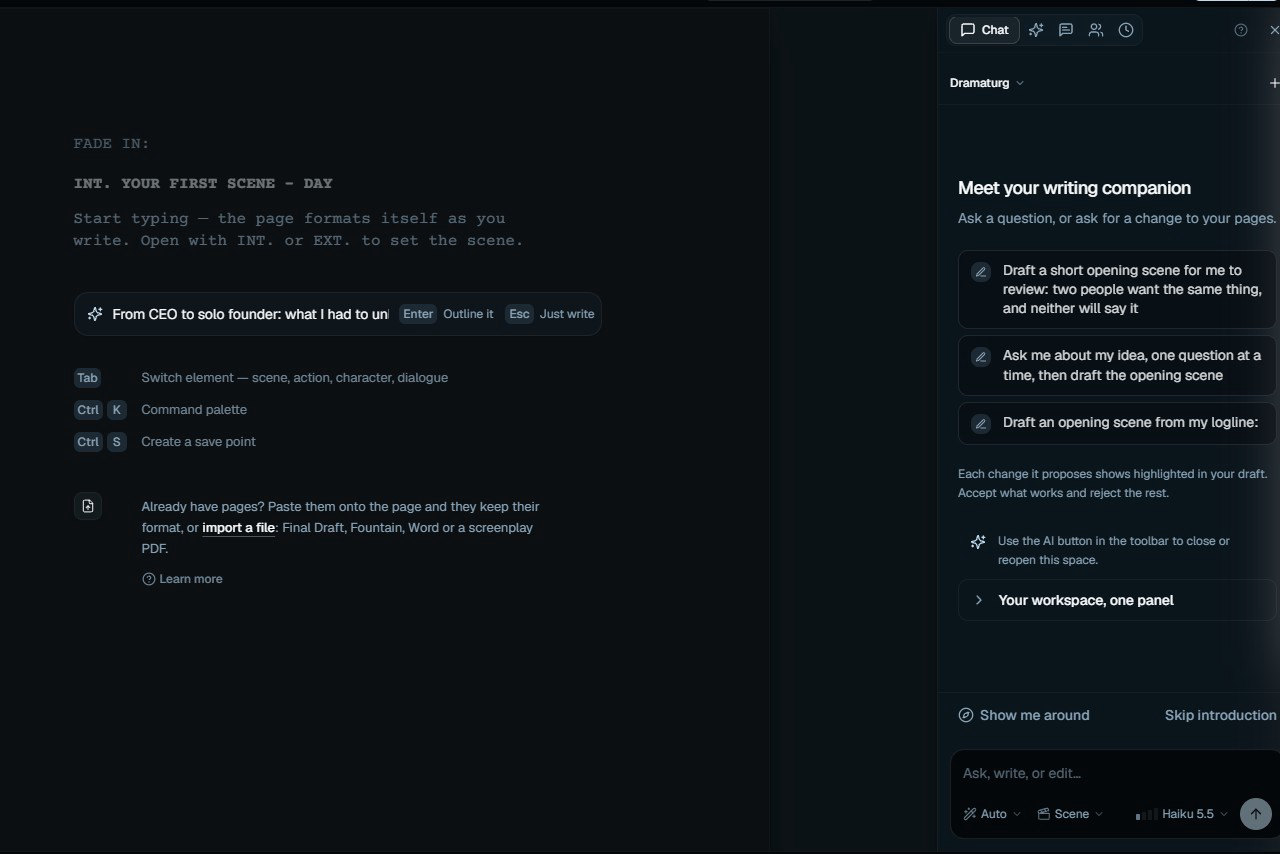
A new script opens on "FADE IN:" and a sample scene heading, with three tips underneath: Tab switches between scene, action, character and dialogue, Ctrl K opens the command palette, and Ctrl S creates a save point. That is genuinely most of what you need to know.
Plot supports 16 screenplay elements, from scene headings and dual dialogue to lyrics, title pages and a boneyard for cut material, and there is no formatting menu between you and the page. Type "INT." and you are in a scene heading. Press Tab after a character name and you are in dialogue. It suggests character names and locations you have already used, numbers your scenes, and keeps a live page count as you go. A focus mode clears everything else away when you just want to write.
If you already have pages, you can paste them in and they keep their format, or import a file: Final Draft, Fountain, Word or even a screenplay PDF.
One small touch I liked: before the first scene, there is a line for your idea. I typed mine, a story about a startup CEO who quits after nine years to build alone, and Plot offered two choices: press Enter to have it outline the idea, or Escape to just write. It is a nice way to start, because it meets you where you are, whether that is a plan or a blank page.
Ghost text: a co-writer finishing your sentence
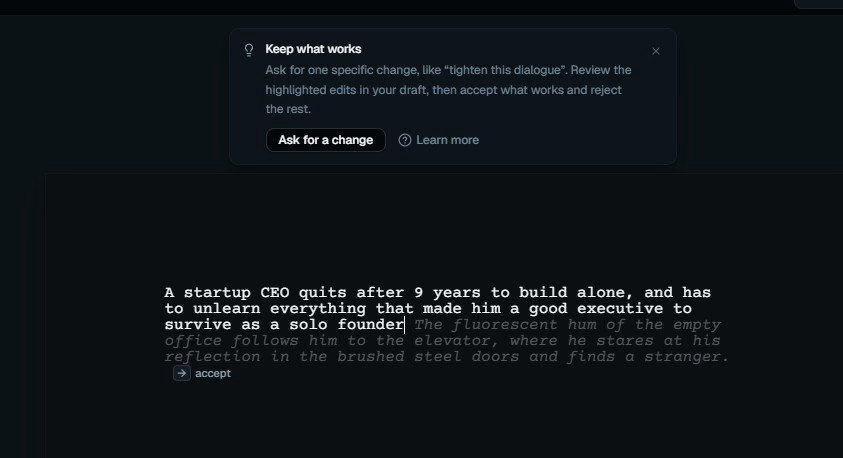
As you write, Plot quietly suggests what could come next, in grey italic text after your cursor. Right Arrow accepts it and Escape dismisses it.
After my logline, it offered this: "The fluorescent hum of the empty office follows him to the elevator, where he stares at his reflection in the brushed steel doors and finds a stranger." That is a real screenwriting suggestion. It is visual, it is something a camera can see, and it turns the abstract idea of "unlearning who you were" into an image. It is also only a suggestion. Nothing lands on the page until you accept it.
The Dramaturg: an AI that reads your script
In theatre, a dramaturg is the person who helps writers shape a play: asking questions, pointing out what isn't working, suggesting where to go. It is a good name for Plot's AI, because that is how it behaves. It lives in a panel beside your page, it reads your actual script rather than whatever you paste into it, and every change it proposes appears in your draft for you to approve.
The panel opens with three starter prompts that are worth trying in order: draft a short opening scene where two people want the same thing and neither will say it, ask me about my idea one question at a time and then draft the opening scene, or draft an opening scene from my logline. Underneath the message box, you can choose the mode, the scope (a scene, for example) and the AI model.
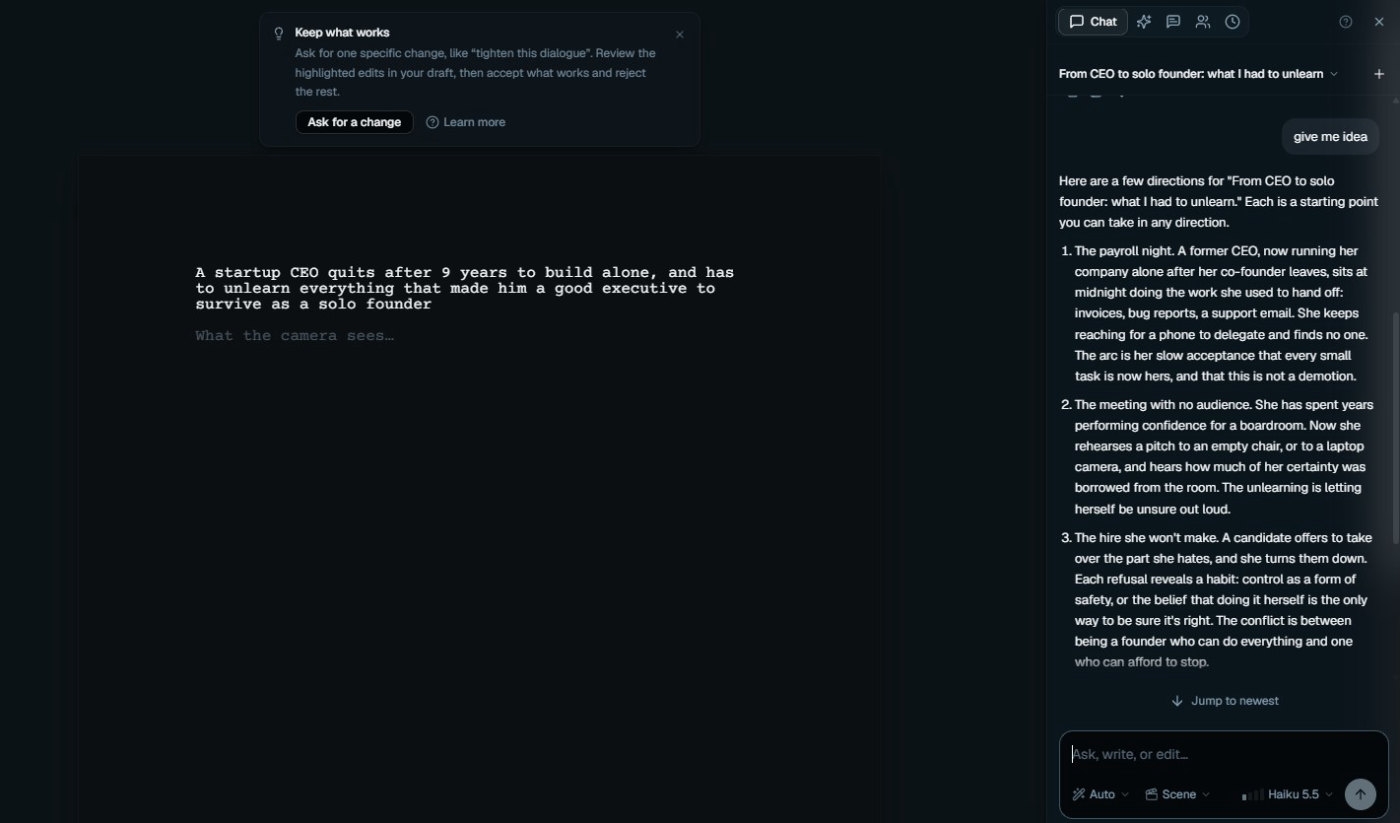
I tested it the lazy way, typing just "give me idea". The Dramaturg came back with three directions for my logline, and each one was a story engine rather than a vague theme:
- The payroll night. A former CEO, alone after her co-founder leaves, sits at midnight doing the work she used to hand off, and keeps reaching for a phone to delegate to no one.
- The meeting with no audience. She rehearses a pitch to an empty chair and hears how much of her certainty was borrowed from the room.
- The hire she won't make. A candidate offers to take over the part she hates, and every refusal reveals a habit: control as a form of safety.
Each one gives an actor something to play and a reader something to feel. That is what a good script editor does in a first meeting.
Plot's AI comes in five sizes, and it helps to know which one to reach for:
| Tool | What it does | Reach for it when |
|---|---|---|
| Ghost text | Suggests the next phrase as you type | You are drafting and want momentum |
| Ask | Answers questions about your draft, grounded in your pages | You want a diagnosis or an opinion, not a change |
| Edit selection (Ctrl or Cmd + K) | Rewrites the passage you highlight, in place | The line is close, but not right |
| Skills | Runs a named craft job across the scope you choose | You need a focused pass, like dialogue or continuity |
| Agent Mode | Works toward a goal across a scene or an act, in several steps | The revision is bigger than one passage |
The skills are where Plot feels most like a professional tool. Inkwell lists 28 of them. A Dialogue pass rewrites one character's voice consistently across scenes. A Continuity check hunts for props that vanish, time-of-day jumps and characters who know things they shouldn't. The Character runner maps each character's emotional arc and shows the dead spots. Script Coverage gives you notes the way a professional reader would, and Scene Necessity asks what each scene actually does for the story. The analysis skills return findings without changing a word, so you can get notes without handing over the pen. On Pro, you can also write your own custom skills.
From idea to scene, with you approving every line
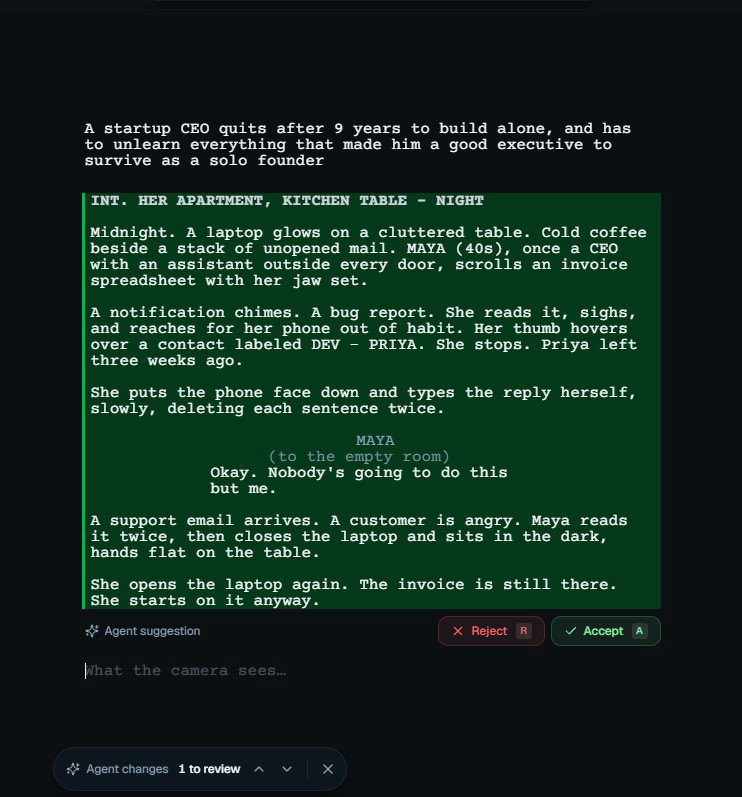
I asked the Dramaturg to take the first direction further, and it drafted the opening scene straight onto my page: "INT. HER APARTMENT, KITCHEN TABLE - NIGHT". Midnight, cold coffee, an invoice spreadsheet. A bug report comes in, and Maya's thumb hovers over a contact labelled "DEV - PRIYA" before she remembers Priya left three weeks ago. She types the reply herself, deleting each sentence twice. Then, to the empty room: "Okay. Nobody's going to do this but me."
Two things stood out. First, it came back as a properly formatted screenplay scene, with a scene heading, action, a character cue, a parenthetical and dialogue, not as a block of prose I would have to reformat. Second, it did not simply appear in my script. It arrived highlighted in green, labelled as an agent suggestion, with Reject and Accept buttons (R and A on the keyboard) and a small bar counting the changes left to review. Nothing joins the draft you keep until you say so.
For bigger jobs, Agent Mode takes a goal for a scene or an act, such as "tighten Act Two" or "make the antagonist more present", and works through it in several steps: editing lines, running skills, re-reading the result and deciding what to do next. It works on a separate result draft, so your own version is never touched while it runs. You can pause or stop it at any time, and it will stop and ask you when a creative decision is yours to make. Then you review everything it changed, line by line or all at once.
By design, Agent Mode starts from a script and a goal you give it; it does not turn a logline into a finished screenplay with one click. That is a thoughtful choice. You stay the writer, and the AI does the work of a very fast, very patient collaborator.
Save points and draft lines: version control for writers
This is the part of Plot that will change how you work, and it is the part no traditional screenwriting app offers in this form.
Save points are named snapshots of your script that never change. Press Ctrl S, call it "Table read draft" or "After the producer's notes", and you can always return to it. Draft lines are parallel versions of the same screenplay: try the happy ending, or a rom-com version of Act Two, without copying files or losing your main draft. If the experiment works, you bring in the changes you want and leave the rest. If it doesn't, nothing in your main draft has moved.
You can compare any two versions, and the comparison works at the level writers think in, scene by scene and line by line, rather than as a wall of changed characters. Import a new draft of a script you already have, say "Pilot v3.fdx", and Plot offers it as a new draft of that project, with a "See what changed" view showing exactly which lines are new. For anyone who has ever compared two PDFs by eye before a notes meeting, that alone is worth the switch.
Start in prose, finish in script
Inkwell's brief to me stressed one idea above the others: Plot is meant to replace both Final Draft and Word, so a story can start as notes or an outline and grow into a script naturally, in one place.
In practice, that means outlines, treatments and series bibles live in Plot as prose. When a beat is ready, you select it and choose "Turn into script", then write the scene yourself or ask Agent Mode to draft it. The rest stays prose until you get there. You can also import the treatment you already have as a Word file and continue from it. It is a much more natural way to develop a story than keeping the planning in one app and the pages in another.
Ready for the production office
Plot does not stop at the spec script. On the Pro plan, it carries your screenplay through production:
- Locked scripts with numbered pages, A-pages (42A and 42B, so the rest of the script keeps its page numbers) and omitted scenes.
- The full WGA revision colour sequence, all ten colours from white to tan, on the same structured draft.
- Breakdown reports such as cast lists, scene breakdowns and day-out-of-days, built from your script rather than typed in again, and exported to PDF or CSV.
Before any export, a submission preflight checks your title page and printable structure, and lets you prepare an anonymous copy when a submission calls for one.
For the room, Pro lets you invite up to five collaborators across your projects, and the Team plan adds real-time co-writing with live cursors, threaded comments anchored to the line they are about, shared draft lines, shared skills, role-based permissions, an audit log and free viewer seats for producers and executives. Inkwell says production scheduling and stripboards are in progress too.
Import and export
Plot reads and writes the formats your collaborators already use, so nobody has to change software to work with you:
- Final Draft (.fdx): import and export, in both directions. Export is included from the Writer plan.
- Fountain: native, so a plain-text round trip loses nothing.
- PDF: export in industry screenplay format, and import of screenplay PDFs.
- Word (.docx): import, and export from the Writer plan.
- WriterDuet, Highland and Celtx: import.
After an import, Plot gives you an import report so you can check your scene headings, characters and dialogue came in as you expect before you start writing.
Your script stays yours
For a screenwriter, the most important question about an AI tool is what happens to the script. Inkwell's answers are clear:
- No training on your work. Your scripts are not used to train AI models.
- Only what the job needs. An AI request sends the scenes or passage involved, not your whole library.
- You own it. Inkwell claims no ownership of your screenplays or their history, and you can export at any time. Downgrading or cancelling never deletes a draft.
- Your own key, if you prefer. You can connect your own AI provider account in settings, or simply use Inkwell's hosted AI.
- Built with the WGA in mind. The AI works on a draft you supply and never writes a whole screenplay from one prompt, and save points record the decisions you made, which helps you follow a room's or a studio's AI policy.
Scripts are encrypted in transit and at rest, and support is the team's own inbox, with people answering rather than ticket numbers.
Pricing
Plot is free to start, with four other plans for different stages of a career. These are the prices on Inkwell's pricing page on 16 November 2026:
| Plan | Price | Projects | Draft lines per project | AI skill runs a month | Ghost-text suggestions a day | Highlights |
|---|---|---|---|---|---|---|
| Free | $0 | 2 | 2 | 20 | 100 | The full editor, save points, PDF and Fountain export |
| Writer | $19 a month | 10 | 10 | 200 | 1,000 | Final Draft and Word export, complete version history, Sonnet-tier AI models |
| Pro | $39 a month | 50 | 50 | 1,000 | 5,000 | Opus-tier AI models, custom skills, production tools, up to 5 collaborators, early access to Canvas |
| Team | $39 per seat a month | 200 | 100 | 5,000 | 10,000 | Real-time co-writing, shared workspaces, pooled AI credits, permissions, free viewer seats, priority support |
| Enterprise | Custom | Unlimited | Unlimited | Unlimited | Unlimited | SSO, custom deployment, API access, an SLA and custom model setup |
Runs you make with your own Anthropic or OpenAI key do not count against these AI allowances, which is a handy option if you already pay for one.
A simple way to choose: write your spec on Free, which is a real writing plan, not a trial. Move to Writer when someone asks you for a Final Draft file or you want the full version history. Choose Pro when the script goes into production or you want the most capable AI models, and Team when a whole room works on the same show. Verified students and educators get 50% off Pro after the beta; Inkwell handles that by email at [email protected].
How it compares
If you are choosing screenwriting software, these are the names you will see most often. Here is how Plot sits next to them, using what each vendor published on its own pages on 16 November 2026 (prices in US dollars):
| Price to start | Free plan | AI in the editor | Versions and alternate drafts | Real-time co-writing | Works on | |
|---|---|---|---|---|---|---|
| Inkwell Plot | Free; Writer $19 a month; Pro $39 a month | Yes | Ghost text, Ask, Edit selection, 28 skills and Agent Mode, on every plan; each change reviewed on your page | Named save points, draft lines, scene-by-scene comparison | Yes, on Team; Pro invites up to 5 collaborators | Any browser; desktop and Apple apps in development |
| Final Draft 13 | $249.99 one-time licence ($199.99 on sale when I checked), or the Final Draft Suite from $99.99 a year | No; 5-day trial of the Suite | None listed | Revision mode with colours, locked pages and alternate content | Yes, in the desktop app | Mac and Windows; web through Final Draft Cloud with the Suite |
| WriterDuet | Plus $9.99 a month; Premium $13.99 a month | Yes, 3 projects | None in the editor; AI proofreading is a separate service at $20 per script | Change history on every plan; snapshots and full line history on Premium | Yes; inviting editors needs Plus | Web, desktop apps on paid plans, iOS |
| Arc Studio | Essentials $69 a year; Pro $99 a year | Yes, 2 scripts with a watermarked PDF | Paid add-ons bought with credits: table read, character images, research assistant | Draft history, coloured revisions, Branch & Merge (history tools on Pro) | Yes; inviting needs Pro | Web, Mac, Windows, iPhone and iPad |
| Fade In | $79.95 one-time licence | Free demo with watermarked output | None listed | Revision colours, scene and page locking, compare versions | Through Fade In Access, an optional subscription | Mac, Windows, Linux; Fade In Access on web, iOS and Android |
Read it as a map rather than a scorecard, because each tool has its own strengths. Final Draft is still the file format production offices expect, and Plot reads and writes .fdx in both directions, so choosing Plot never cuts you off from it. WriterDuet is a long-standing favourite for co-writing on a budget. Arc Studio is the closest to Plot on versions, with its Branch & Merge feature. Fade In is the low-cost, pay-once option for writers who want a desktop app.
Plot's case is the combination. It is the only one of the five whose own pages describe AI that drafts and revises script text inside the editor, and that AI comes with every plan, Free included. Add named save points, draft lines, production tools and a free plan with the full editor, all in one browser tab, and it covers the whole journey from first idea to shooting script in a way none of the others does on its own.
What to know before you sign up
- Plot runs in your browser. There is nothing to install, and it works on Windows, Mac, Linux and Chromebooks. A desktop app for offline writing is in active development, and iPhone and iPad apps are next on the roadmap. On a phone today, you can already read your script and leave notes on a line.
- Start with the Learn Inkwell template. It teaches the editor, the Dramaturg and save points inside a real screenplay, which is faster than any help page.
- Name your save points. "Table read draft" is far more useful in three months than "Tuesday". Free keeps recent history, and named save points are always kept.
- Give Agent Mode a scene or an act. It works best with a clear goal at that scale, and you review everything it changes before it reaches your draft.
- AI use comes in monthly allowances. Each plan includes a number of skill runs and ghost-text suggestions, within a monthly AI budget. If you write a lot, you can buy prepaid credit packs, turn on overage, or bring your own AI key.
- Final Draft export starts on Writer. Free exports PDF and Fountain, which is all you need to share a script for reading.
- Writing a novel? That is Canvas, Inkwell's long-form editor, in early access for Pro and Team subscribers.
- It improves every week. Inkwell's public changelog listed five updates on 14 November alone, and the team says writers' feature requests are how it decides what ships next.
The verdict
Inkwell Plot is the most convincing answer I have seen to the question of what screenwriting software should look like now. The basics are right: industry formatting that stays out of your way, clean Final Draft and Fountain files, and production tools that a real office will recognise. On top of that, it adds two things the old tools never had. Version control turns "which draft is this?" into a solved problem. And the Dramaturg is an AI that behaves like a good collaborator: it reads your pages, gives you concrete ideas, writes in proper screenplay format, and never changes a word of your draft without your approval.
It suits any screenwriter who is tired of juggling Word, Final Draft and a chat window, writers' rooms that need parallel takes without losing the room's history, and anyone curious about AI who wants to stay firmly the author of their script. The free plan includes the full editor and real AI help, so the easiest way to judge it is to write one scene in it. You can also find Inkwell on LaunchIt.
Start writing in Plot for free
Frequently asked questions
Is Inkwell Plot free?
Yes. The Free plan includes the full screenplay editor, save points, two projects with two draft lines each, 20 AI skill runs a month, 100 ghost-text suggestions a day, and PDF and Fountain export. It is a plan, not a trial.
How much does Inkwell Plot cost?
On 16 November 2026, Writer cost $19 a month, Pro $39 a month and Team $39 per seat a month. Enterprise pricing is agreed directly with Inkwell.
Does Plot work with Final Draft files?
Yes. Plot imports Final Draft (.fdx) scripts with their scene headings, characters and dialogue, and exports .fdx from the Writer plan, so you can work with anyone who uses Final Draft. It also handles Fountain, PDF and Word.
Will the AI write my screenplay for me?
No, and that is deliberate. The AI suggests, answers, rewrites what you select and drafts scenes you ask for, but it works from your script and your goals, and every change waits for you to accept or reject it. You remain the writer.
Does Inkwell train AI models on my scripts?
No. Inkwell says your scripts are not used to train AI models, and an AI request only sends the part of the script the job needs.
Is Inkwell Plot suitable for WGA writers?
It is designed with WGA guidance in mind: the AI works on material you write, never generates a whole screenplay from one prompt, and nothing enters your draft without your approval. Your own agreement and your studio's policy still decide what you may use on covered work.
Can several writers work on the same script?
Yes. Pro lets you invite up to five collaborators across your projects, and Team adds real-time co-writing, shared draft lines, comments and role-based permissions for writers' rooms.
Which AI models does Plot use?
It depends on your plan. Free runs a standard model (Haiku 5.5 in my session), Writer adds Sonnet-tier models, and Pro adds the most capable, Opus-tier ones. You can also bring your own Anthropic or OpenAI key and choose from that provider's models.
Can I use Plot offline or on my phone?
Plot runs in the browser today. A desktop app for offline writing is in active development, and iPhone and iPad apps are next. On a phone, you can already read your script and add notes.
Can I write stage plays and TV scripts in Plot?
Yes. Plot handles feature films, TV episodes and stage plays, and comes with Short Film and Stage Play templates to start from.
Free tools mentioned in this article
No account, no credit card. Built for founders doing their own SEO.
Ask AI about this article
Open your assistant with the article preloaded: key takeaways and next steps.