PBN.LTD Review: Footprint-Free Hosting With an SEO Toolkit Built In
PBN.LTD review: I took the 7-day trial and went through the dashboard. PBN hosting from $1 a site, separate money-site hosting, and the risk to know about.
On this page
Most hosts treat ten websites as one customer with ten folders. PBN.LTD is built on the opposite idea: every site should look like it belongs to somebody else. I opened a trial account and went through the dashboard screen by screen.
Disclosure: this is a paid review. LaunchIt was paid to write it, and links to pbn.ltd on this page are marked as sponsored.
Category: Web Hosting for SEO · Website: pbn.ltd
I run three products and none of them is a blog network, so I came to PBN.LTD as an outsider to its niche. I expected a reseller panel with a clever name. What I found is a large, opinionated hosting platform with more SEO tooling in the sidebar than some dedicated SEO products have on their whole site.
Rather than repeat the marketing pages, I registered for the trial and clicked through everything a new customer sees. The screenshots below are from that account.
What PBN.LTD is
PBN.LTD is specialist web hosting for SEO professionals and agencies who run many sites at once. It is operated by PBN HOSTING SL, a company registered in Alicante, Spain, and it sells two separate kinds of hosting from one dashboard:
- PBN hosting for networks of small sites, priced per site, where the platform spreads your sites across different IPs, CDNs and DNS providers so they share no hosting footprint
- Money-site hosting for the main business site, shop or client site, on separate servers and separate IP ranges
The second line is the part I did not expect. PBN.LTD's own position is that a site that earns should never share a server with a network, so the money-site plans run on a different company's platform (Zinn Digital LTD, the team behind Zinn Hub) and are simply bought and managed from the same dashboard.
Signing up: the 7-day trial
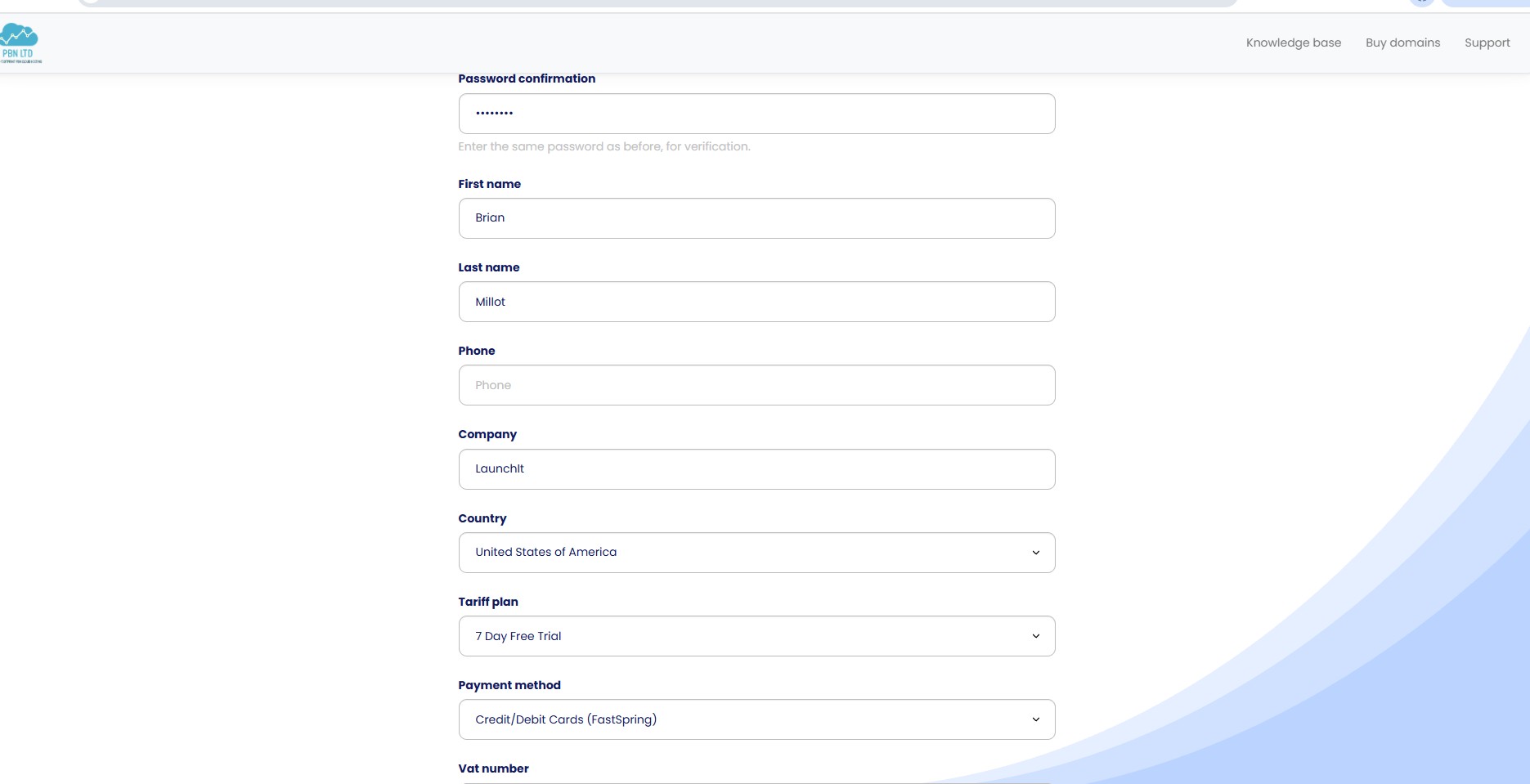
Registration is one form: name, company, country, and a tariff plan that is already set to the 7 Day Free Trial. PBN.LTD says no card is required for the trial, and there is a 30-day money-back guarantee on the first payment after it.
Two small details say who this is built for. There is a VAT number field on the sign-up form, and the support menu sits next to a knowledge base and a domain shop before you have even logged in. This is a tool for people who invoice clients.
The dashboard
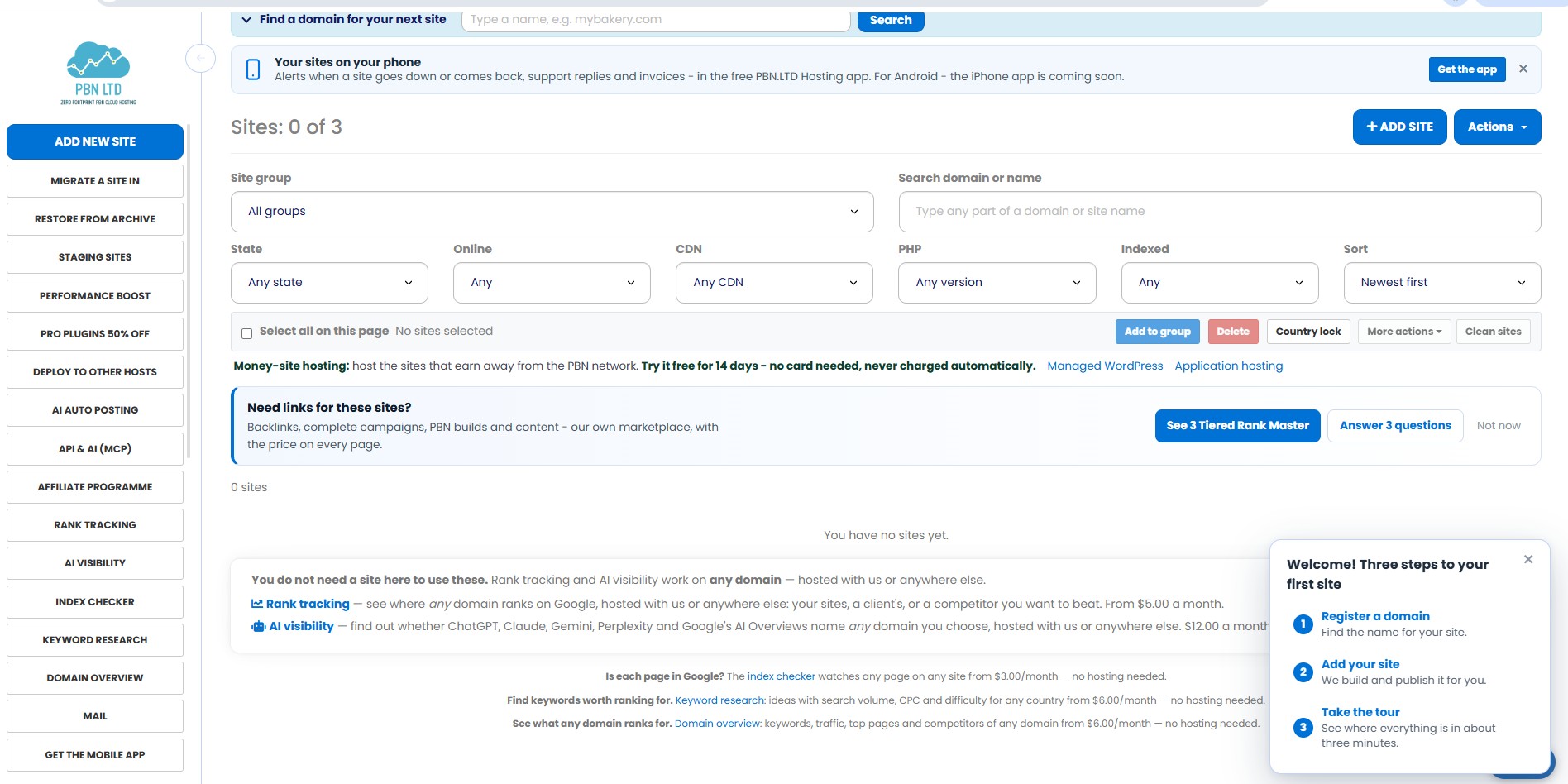
The trial account opens on the sites list, with room for three sites. A small checklist in the corner walks you through the first one: register a domain, add your site, take the tour.
What stood out is how much of the screen is about managing sites in bulk. You can filter by state, by CDN, by PHP version and by whether Google has indexed the site, put sites into groups, and apply actions such as a country lock to a whole selection. On a host built for one website, none of that exists. On a host built for fifty, it is the difference between a five-minute job and an afternoon.
The sidebar is long: migrations, restore from archive, staging sites, AI auto posting, an API and MCP server, rank tracking, AI visibility, an index checker, keyword research, domain overview and mail. It is a lot to take in on day one, and the three-step checklist and the short tour are there for exactly that reason. Once you know where things are, having rank tracking and index checks one click away from the site list is the kind of convenience you stop wanting to give up.
Creating a site
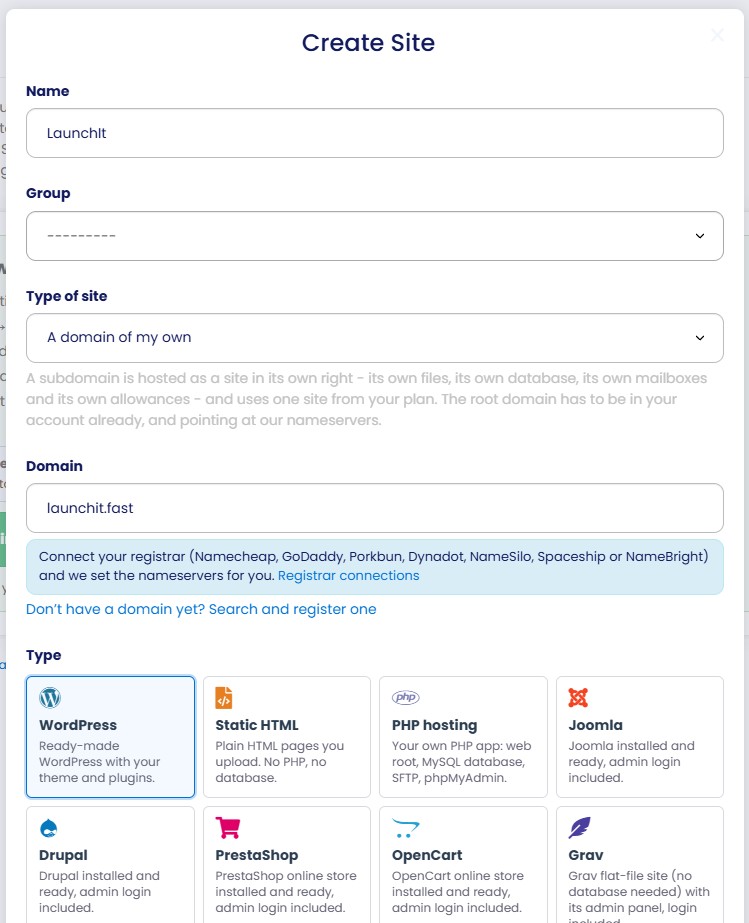
The Create Site form is where the platform shows its thinking. You name the site, optionally put it in a group, enter the domain and pick a type from a grid of tiles: WordPress, static HTML, PHP, Joomla, Drupal, PrestaShop, OpenCart, Grav and more. PBN.LTD lists nine site types on the same plan and the same price.
If your domains are at Namecheap, GoDaddy, Porkbun, Dynadot, NameSilo, Spaceship or NameBright, you can connect the registrar and the nameservers are set for you. Anyone who has pointed thirty domains by hand will understand why that matters.
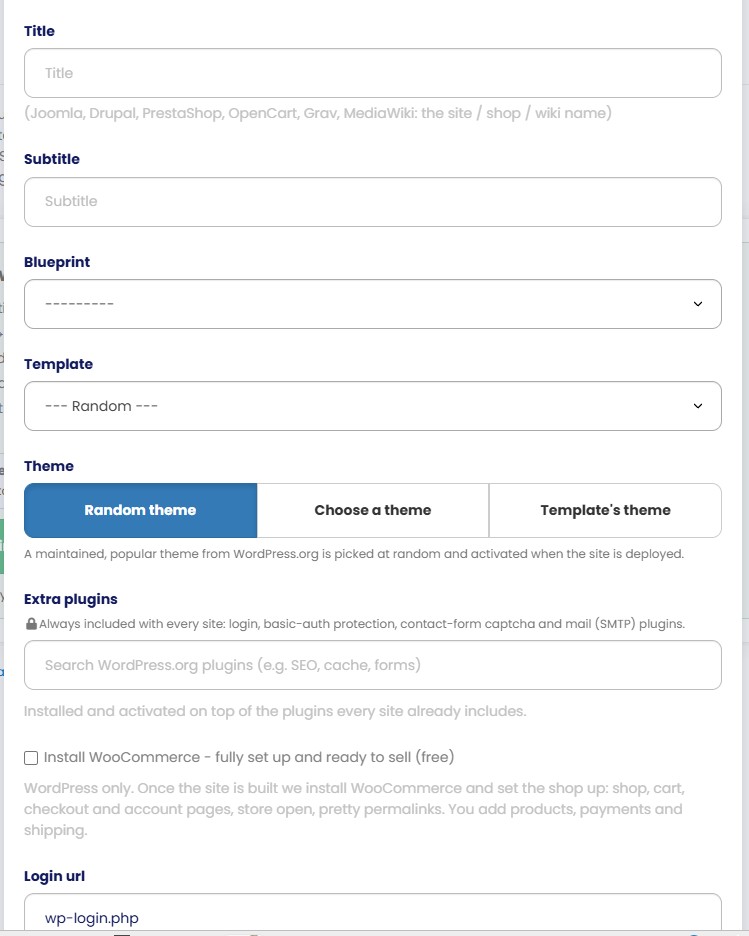
Further down, the options get more specific. The theme can be picked at random from maintained WordPress.org themes, so twenty new sites do not all launch looking identical. You can search WordPress.org for extra plugins to install at creation, tick a box to have WooCommerce set up, and change the login URL. Every site also ships with login protection, basic-auth protection, a contact-form captcha and a mail plugin already in place.
The form asks for a little more than a normal installer and saves a great deal more. It is the settings you would otherwise change by hand on every single site.
How the footprint protection works
This is the core of the product, so it is worth being precise about what it does. Rather than give every site a dedicated IP address in the old "separate C-class" style, PBN.LTD places sites on large pools of shared cloud and CDN addresses, among millions of unrelated websites. It lists six CDNs (Cloudflare, BunnyCDN, CDN77, CloudFront, Gcore and KeyCDN) and several DNS providers, and each site gets its own mix.
The company explains its reasoning at length in its own write-up, and the argument is coherent: a cheap dedicated IP in a block full of other SEO sites is a worse neighbourhood than a shared address at a major cloud provider. If a CDN takes a site offline, the platform says it moves the site to another provider within the hour.
What I liked is that the approach is explained openly, with the reasoning written out, where most hosts in this niche hide behind the word "algorithm". I did not put live sites on the trial, so I am reporting the design here, not a test of it, and the design is the most thought-through I have seen described.
Moving existing sites in
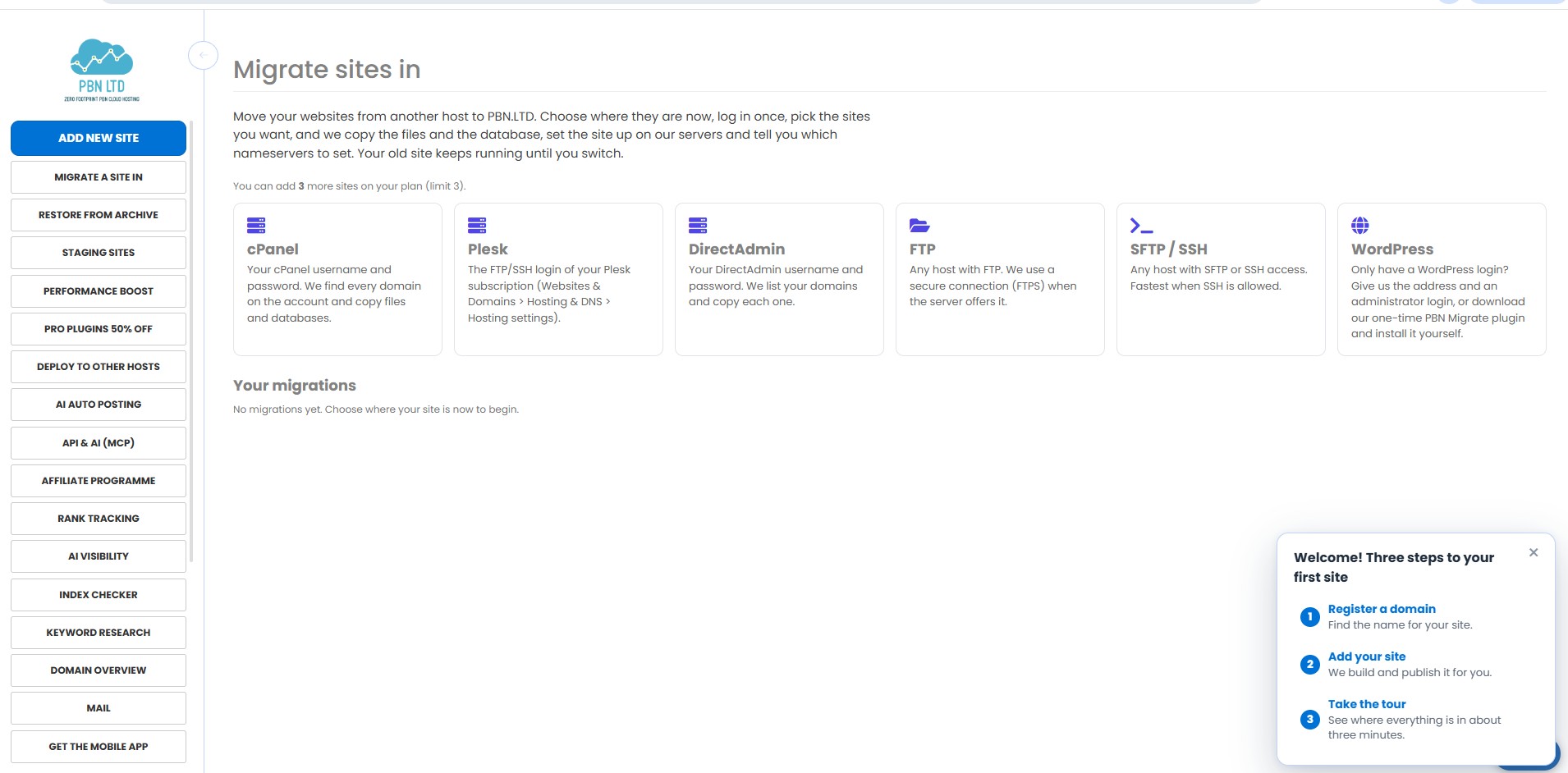
For anyone with an existing set of sites, this is the screen that decides whether switching is realistic. Migrations are free and self-service: you choose where the sites are now (cPanel, Plesk, DirectAdmin, FTP, SFTP or SSH, or just a WordPress admin login), log in once, and tick the sites to copy. Files and databases come across, and you are told which nameservers to set.
The line I liked most on this page is the last one: your old site keeps running until you switch. That is how a migration should work, and plenty of hosts still make it a support ticket.
The SEO toolkit
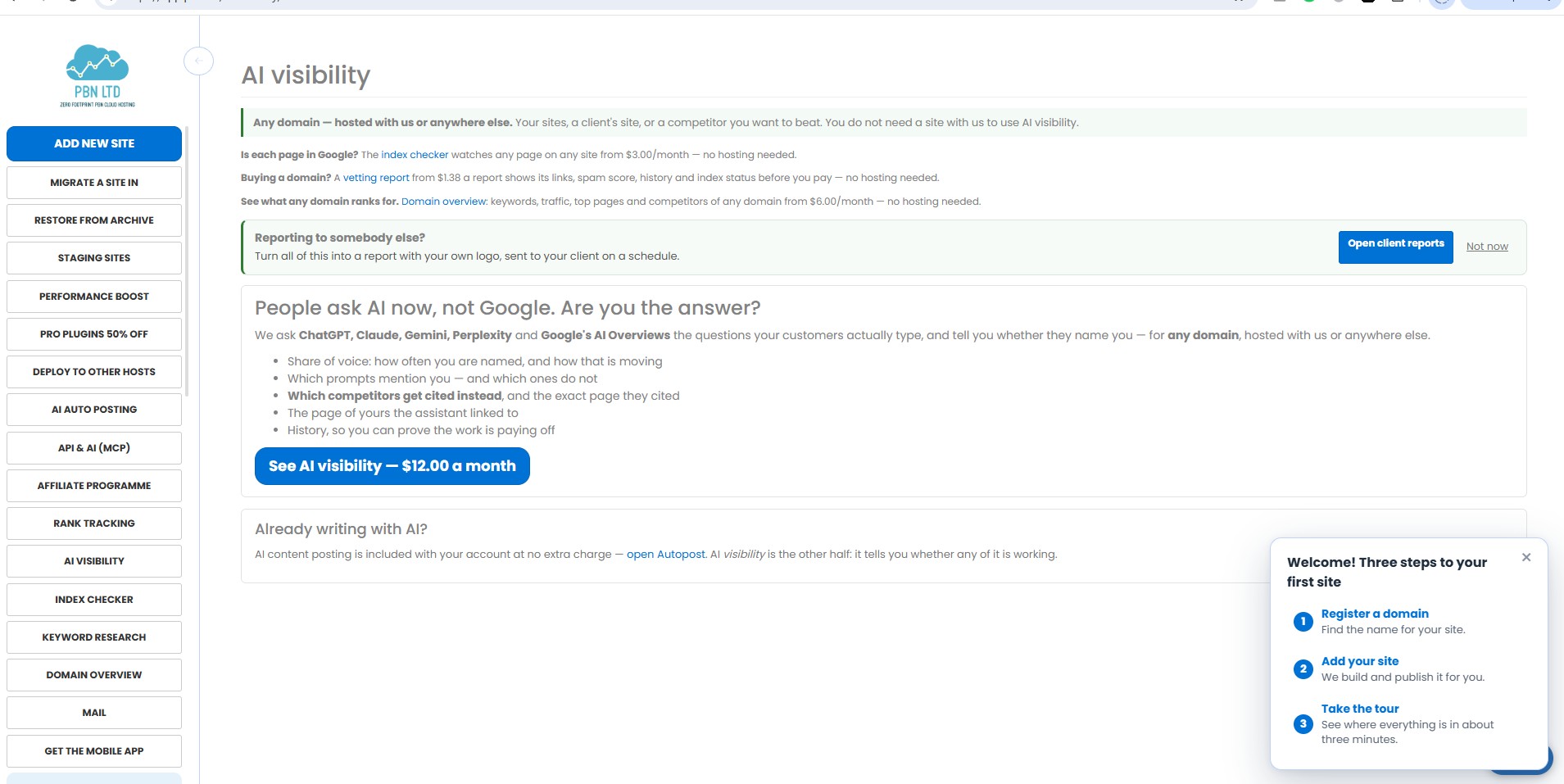
The surprise of the trial was how much of the product is not hosting at all. The dashboard includes a set of SEO tools that work on any domain, hosted with PBN.LTD or anywhere else. The prices I saw in my account:
| Tool | What it does | From |
|---|---|---|
| Index checker | Watches whether each page is in Google | $3 a month |
| Rank tracking | Google positions for any domain | $5 a month |
| Keyword research | Search volume, CPC and difficulty by country | $6 a month |
| Domain overview | Keywords, traffic, top pages and competitors | $6 a month |
| AI visibility | Whether AI assistants name your domain | $12 a month |
AI visibility is the one I would point a founder at. It asks ChatGPT, Perplexity and Google's AI Overviews the questions your customers type, every week, and reports whether the answers name you, which page they cited, and which competitors got cited instead. Claude and Gemini are available as premium engines. We have written about getting cited in Google AI Overviews, and measuring it is the part most people skip.
There is also an API and MCP server included with the account, so an assistant such as Claude, ChatGPT or Cursor can list your sites, edit DNS records or publish a post through one URL, with keys limited to the areas and sites you choose. For a hosting company, that is unusually current.
Add-ons worth knowing about
External Deploy
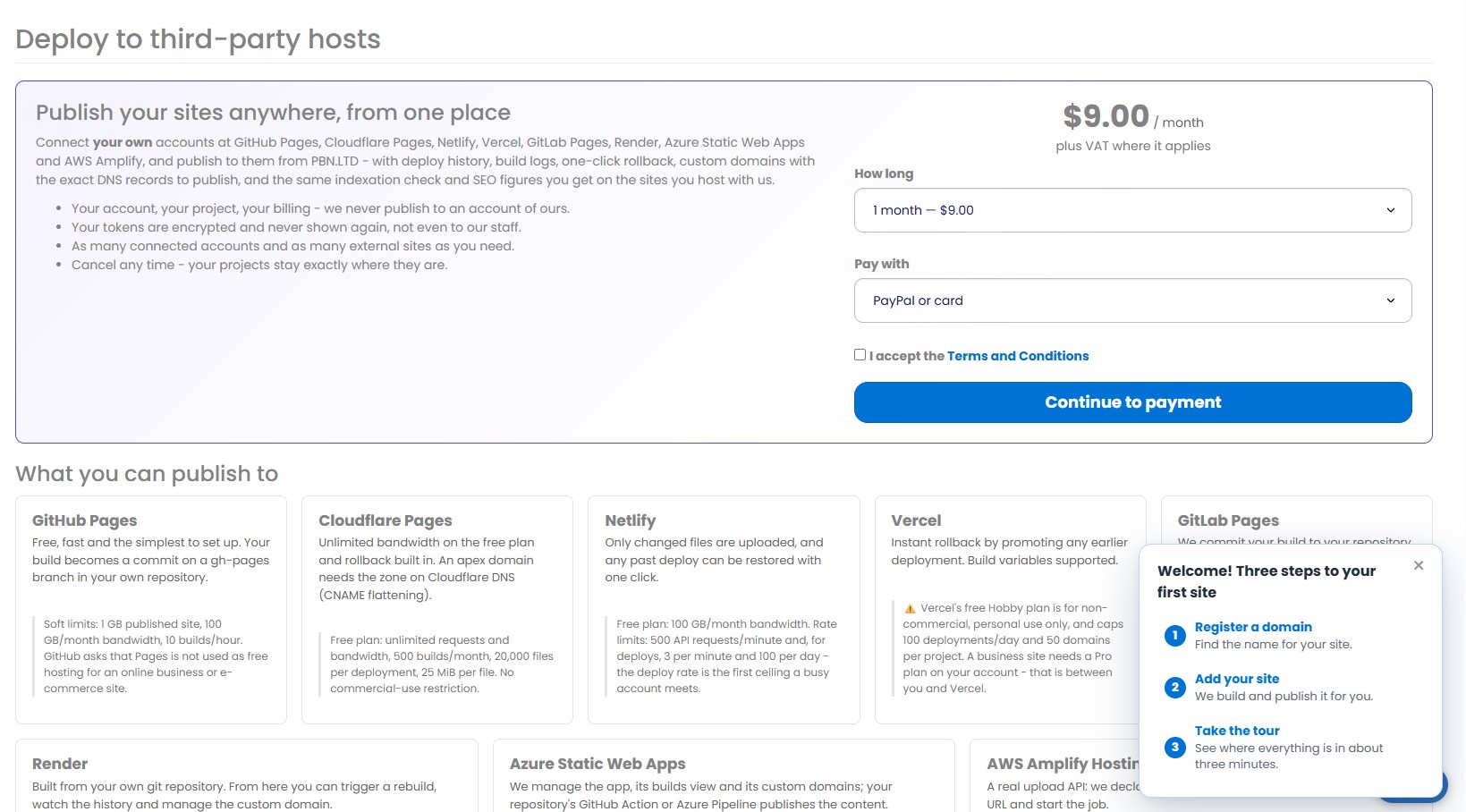
For $9 a month you can publish sites to your own accounts at GitHub Pages, Cloudflare Pages, Netlify, Vercel, GitLab Pages, Render, Azure Static Web Apps and AWS Amplify, with deploy history, build logs and rollback. The projects stay in your accounts, so cancelling leaves them where they are.
What impressed me is the honesty of the page. Each host is shown with the real limits of its free plan, including a plain warning that Vercel's Hobby plan is for non-commercial use only. A company trying to oversell would have left that out.
Performance Boost
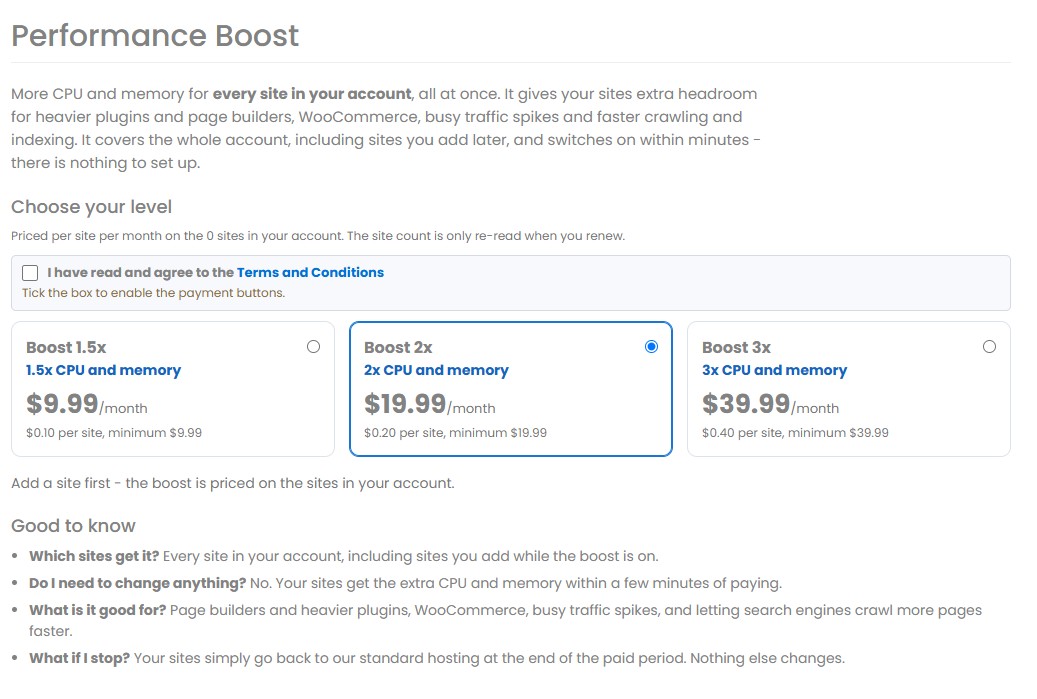
More CPU and memory for every site in the account at once, in three levels: 1.5x from $9.99 a month, 2x from $19.99 and 3x from $39.99, priced per site with those minimums. It covers sites you add later, and if you stop paying, the sites go back to standard hosting with nothing else changed.
Mobile app
An Android app sends an alert when a site goes down or comes back, and lets you answer support tickets and see invoices. The dashboard says an iPhone version is coming.
What it costs
PBN hosting is priced per site and gets cheaper as you add more.
| Plan | Price | Trial |
|---|---|---|
| PBN hosting, 5 to 175 sites | From $6 a month for 5 sites ($1.20 a site) | 7 days |
| PBN volume, 200 to 1,000 sites | $1.00 a site | 7 days |
| Managed WordPress (money site) | From $9.99 a month, less on longer terms | 14 days |
| Application hosting (money site) | From $7.99 a month | 14 days |
Every PBN plan includes the same things: free SSL, your choice of DNS and CDN, a Redis cache, malware scanning, daily and hourly backups with one-click restore, and automatic updates that are undone if they would break a site. The security features are included at no extra charge, which is not the norm at this price.
Read the allowances before you move a large site. The terms give each PBN site 20,000 files, 4 GB of disk and a 400 MB database, with paid add-ons to raise them. That is generous for a small content site and tight for a big shop, which is exactly what the money-site plans are for.
What to know before you join
Two things worth knowing going in, so you pick the right half of the product.
You do not need a network to get value here. The money-site hosting, the free migrations, External Deploy and the SEO tools all make sense for an agency or a founder with a handful of ordinary sites. That is a bigger share of the product than the name suggests, and it is where I would start.
If you do run a network, the hosting is one part of the job. Google's spam policies treat links built to manipulate rankings as link spam, so a private blog network always carries risk, and that is true on any host. PBN.LTD takes care of the hosting footprint, which is the part a host can control, and does it more thoroughly than anything else I have looked at. Content, link patterns and ownership records stay your responsibility. The dashboard also has a marketplace for links and content, which I did not use: this review covers the hosting.
The verdict
PBN.LTD is a more serious piece of software than its name suggests. The bulk management, the free migrations, the per-site security and the API are things I would want from any host that expects me to run more than a few sites, and the SEO tools mean one login covers work that usually takes three subscriptions.
The pages I trusted most were the ones that told me the limits: the free-plan caps on External Deploy, the per-site allowances in the terms, the "your old site keeps running" line on migrations. That habit is rare in hosting, and it is the best reason to believe the rest.
For SEOs and agencies managing many sites, the 7-day trial costs nothing and the migration tool makes it easy to test with a real site. For founders, the AI visibility tracker and the money-site plans are the parts to look at.
Website: pbn.ltd · On LaunchIt: PBN.LTD listing
Frequently asked questions
What is PBN.LTD?
A hosting platform for SEO professionals and agencies who run many sites. It sells PBN hosting, where each site is placed on a different mix of IP, CDN and DNS provider, and separate money-site hosting for main business websites. It is operated by PBN HOSTING SL in Alicante, Spain.
How much does PBN.LTD cost?
PBN hosting starts at $6 a month for 5 sites, which is $1.20 a site, and drops to $1.00 a site from 200 sites. Managed WordPress for money sites starts at $9.99 a month and application hosting at $7.99 a month, with lower prices on longer terms.
Is there a free trial?
Yes. PBN plans come with a 7-day free trial and money-site plans with a 14-day trial. PBN.LTD says no card is required, and the first payment is covered by a 30-day money-back guarantee.
Which site types can I host?
Nine on a PBN plan: WordPress, WooCommerce, Joomla, Drupal, Grav, MediaWiki, OpenCart, PrestaShop and static HTML, plus plain PHP hosting. Money-site application hosting covers 23 applications, including Laravel, Moodle, Matomo and SuiteCRM.
Can I move my existing sites to PBN.LTD?
Yes, free of charge. The dashboard copies sites from cPanel, Plesk, DirectAdmin, FTP, SFTP or SSH, or a WordPress admin login, and your old site keeps running until you change the nameservers.
Do I need hosting to use the SEO tools?
No. Rank tracking, AI visibility, the index checker, keyword research and domain overview work on any domain, hosted with PBN.LTD or anywhere else, and each is billed separately.
What is the difference between PBN hosting and money-site hosting?
PBN hosting is for many small sites, each kept on its own footprint and priced per site. Money-site hosting is for the main business site and runs on separate servers and IP ranges, on Zinn Digital LTD's platform, so the two share no infrastructure.
Does footprint-free hosting make a private blog network risk-free?
No host can promise that. Google's spam policies classify links built to manipulate rankings as link spam, so a network always carries risk. What PBN.LTD does is remove the hosting footprint, by placing each site on a different mix of IP, CDN and DNS provider, which is the part of the risk that hosting controls.
Free tools mentioned in this article
No account, no credit card. Built for founders doing their own SEO.
Ask AI about this article
Open your assistant with the article preloaded: key takeaways and next steps.