Sensecast Review: The Weather App That Explains the Forecast
Sensecast review: 18 forecast sources with the source named on every card, live hazard and power-outage trackers, a weather school, and Pro from $2.99.
On this page
Most weather apps hand you a number and a cloud icon. Sensecast hands you the number, tells you which agency produced it, and then explains what it means for your body, your house and your power line.
Disclosure: this is a paid review. LaunchIt was paid to write it, and links to sensecast.app on this page are marked as sponsored.
Category: Weather App · Platforms: iPhone, iPad, Android, Mac · Website: sensecast.app
I check the weather the way most people do: a glance at the temperature, a look at the rain chance, done. So I went into Sensecast expecting another pretty forecast app with a radar tab. It is not that. It is closer to a meteorologist's toolkit that has been taught to speak plainly, and the details are what make it interesting.
Sensecast is a phone app, so I reviewed it the way you would before installing: the App Store and Google Play listings, the full feature list, the pricing and help pages, and the screens below, which are captures of the current build (version 1.1.0) published by the developer. Where a judgement depends on living with the app through a storm season, I say so.
What Sensecast is
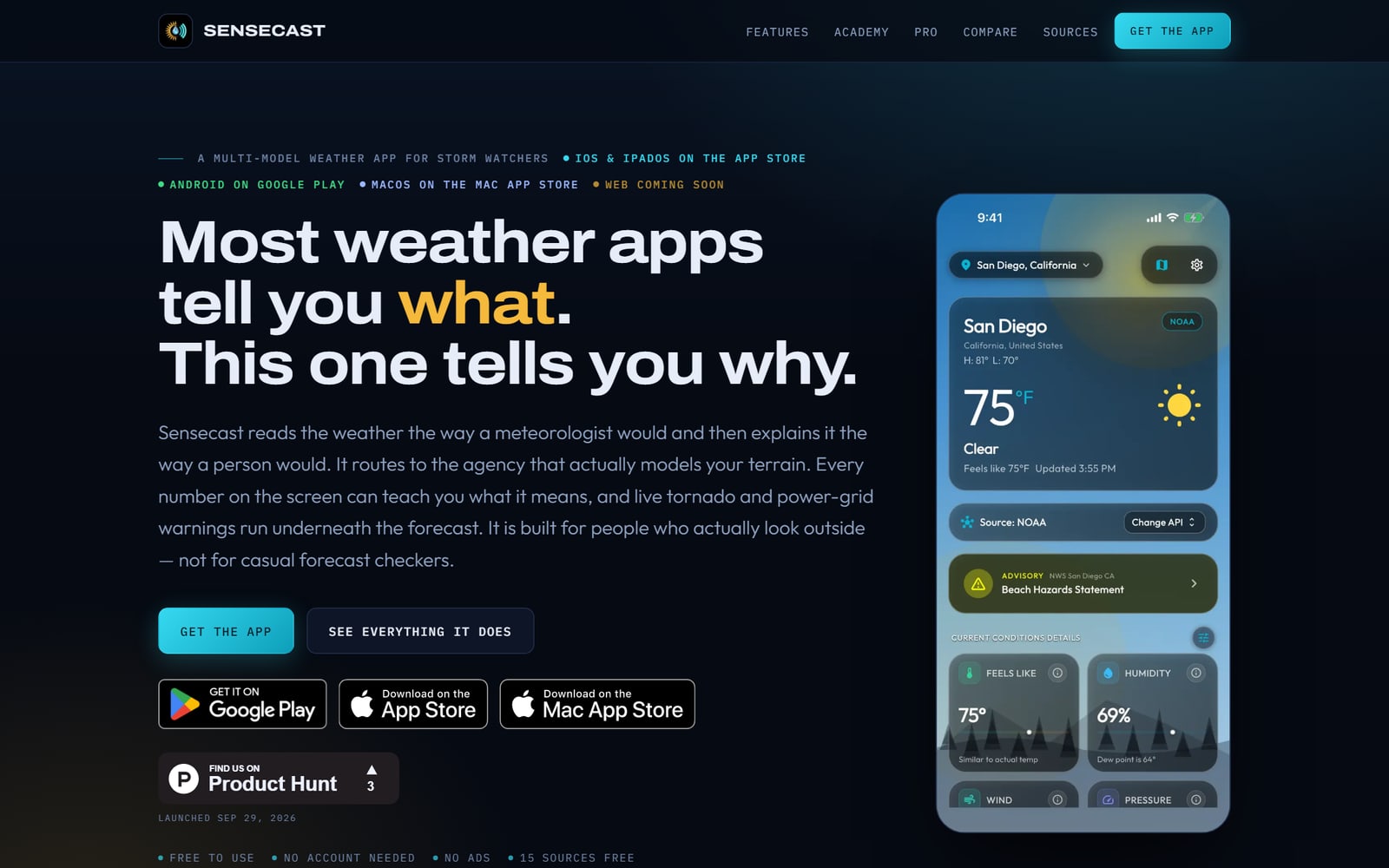
Sensecast is a multi-model weather app from Greigh Studios, a one-person studio in Michigan run by Daniel Hipskind, who designs it, codes it and answers the support inbox himself. It launched on 29 September 2026 on the App Store and Google Play, with a Mac build on the Mac App Store. Windows and Linux builds are on the way, and a web version is planned.
The free version has no ads, needs no account and is a complete app rather than a demo. The homepage puts the idea well: it is built for people who actually look outside, not for casual forecast checkers. That covers storm watchers, people whose power goes out every winter, anyone who gets a headache when the pressure drops, and the curious who want to know why the forecast says what it says.
Three things set it apart, and I will take them in turn:
- It tells you where every number comes from, and lets you pick or compare the source.
- It watches the hazards that reach your house: tornado reports, warnings, earthquakes, wildfires and power outages.
- It teaches you what the numbers mean, with a weather school built into every tile.
The dashboard names its source
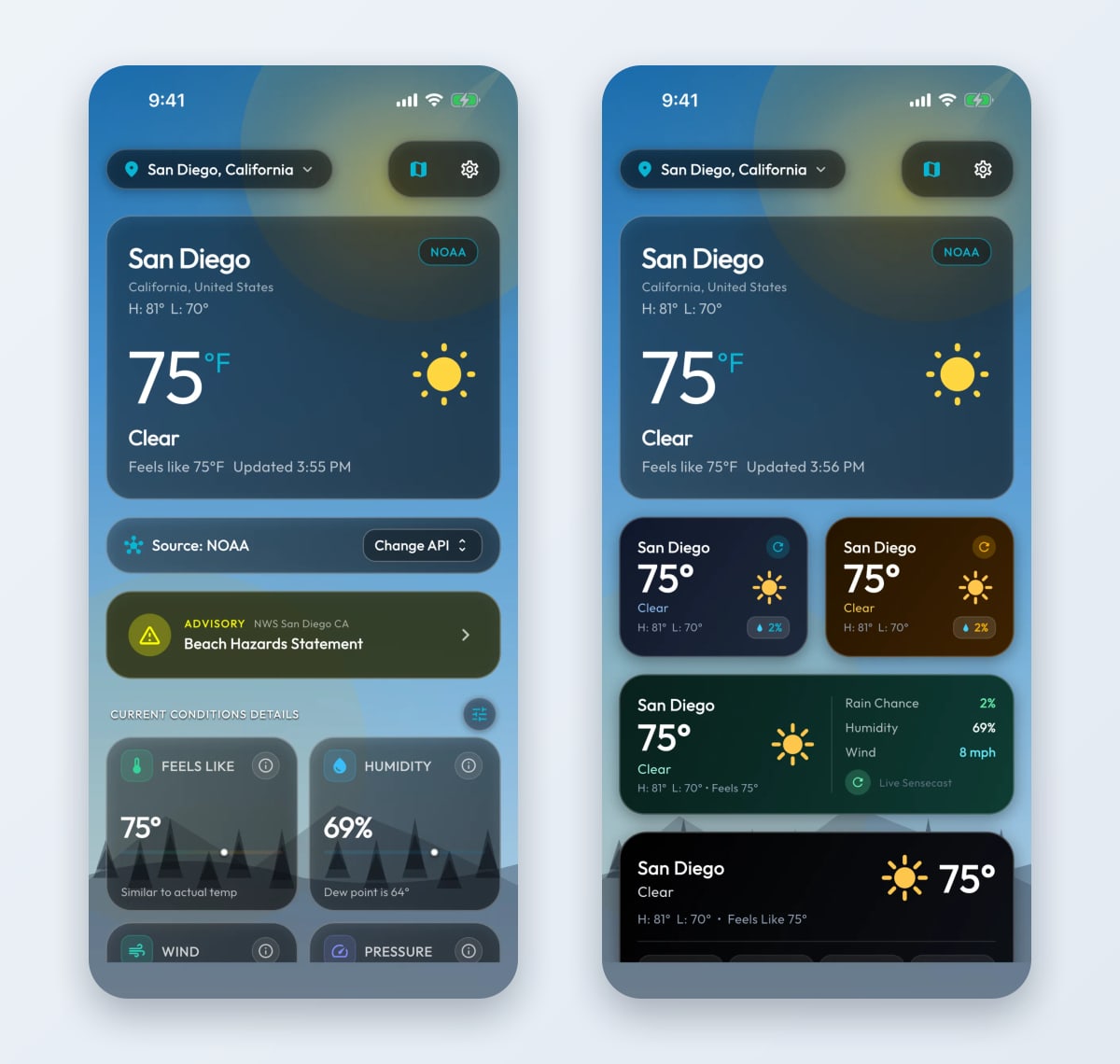
The first thing you notice is a small card under the temperature that reads Source: NOAA, with a Change API button next to it. Most weather apps blend several models into one number and never tell you which one produced it. Sensecast puts the name of the agency on the card, next to the time it last updated.
The clever part is what happens by default. Sensecast does not push one global model everywhere. It detects your location and hands the forecast to the service that actually models your terrain: NOAA and the National Weather Service across the US, MET Norway for the fjords, the Hong Kong Observatory for typhoons, or Météo-France's 1.3 km AROME grid in Western Europe. You can override it whenever you like.
On the free plan that is 15 forecast sources, including the UK Met Office, Japan's JMA, Environment Canada and Germany's DWD, with no API key needed. Pro adds the three flagship supercomputer models: ECMWF IFS at 9 km, NOAA's HRRR at 3 km with sub-hourly updates, and DWD's ICON. That is 18 in total, and Pro can put them side by side in a comparison grid with a consensus mean, so you can see when the models agree and when they do not.
A forecast is a probability, not a fact. An app that shows you which model said it, and lets you ask a second one, is being honest about that.
The dashboard itself is built from 13 condition tiles (feels-like, humidity, dew point, wind with Beaufort, pressure, UV, visibility, cloud cover, rain chance, gusts, air quality, solar elevation and moon phase) that you can reorder or hide. Any active National Weather Service watch, warning or advisory sits right under the current conditions, like the Beach Hazards Statement in the capture above, and opens to the full bulletin.
Behind the cards, a live sky engine draws the current weather: rain with splash rings, drifting cloud layers, snow, fog and lightning, following the sun's arc for your exact location from dawn to night. If you prefer something quieter, there is a gradient-only sky, and Pro adds photographic skies and a pure black OLED mode.
When the weather turns dangerous
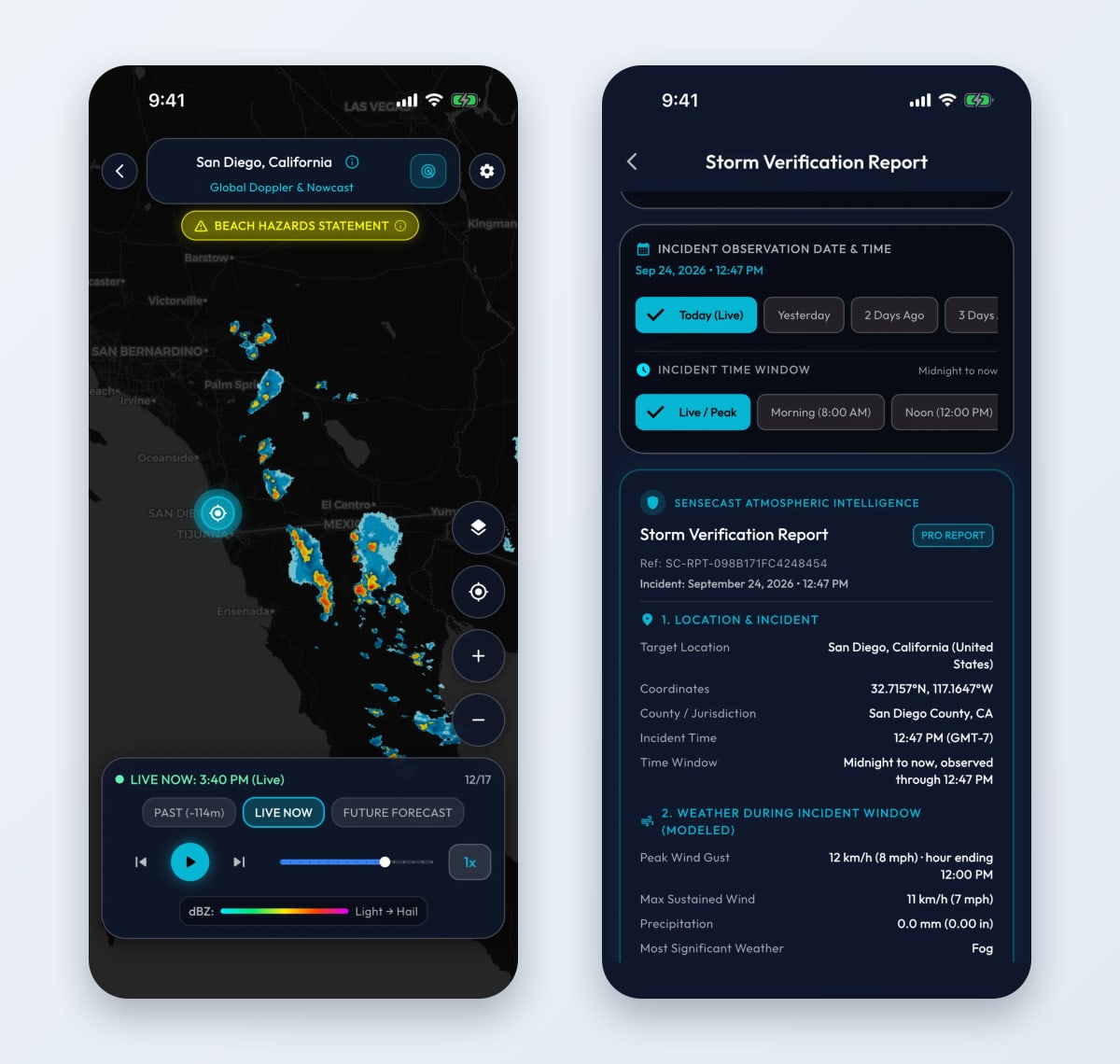
This is where Sensecast earns its tagline. The hazard layer runs underneath the forecast rather than in a separate app, and every feed comes from the agency that publishes it:
- Tornado reports from the NOAA Storm Prediction Center, resolved to county and state, with a local status of all clear, watch, or confirmed rotation nearby.
- Earthquakes of magnitude 2.5 and up within 500 miles, from the USGS, each with a compass bearing, so it reads "38 miles NNE" rather than just "38 miles away".
- Wildfires as NASA satellite heat detections within 150 miles. The card says plainly that these are heat signatures from orbit, not confirmed fire perimeters.
- Tropical cyclones from GDACS, the UN-backed disaster alert system, with a card that says all basins are calm when nothing is running.
The radar is properly built. You scrub roughly two hours of past sweeps, the live composite and a short forecast ahead with one play head, and every tile is cached as it loads, so scrubbing back never flashes black. You can switch between rain radar and infrared cloud satellite and pick your colour scale, including Classic NEXRAD and Dark Sky.
Your power line, not just your sky
The feature I have not seen in another consumer weather app is the power grid card. In the US, Sensecast shows county-level outage counts from the Department of Energy's outage data, plus a weather risk score for your local lines built from gusts, ice, storms and extreme temperatures. Below it sits a directory of electric utilities with one-tap outage hotlines (Consumers Energy, DTE, PG&E, Duke, ConEd and more) and a short blackout safety guide: generator ventilation, the four-hour fridge window, the thirty-foot perimeter around a downed line.
With Pro, Grid Guard sends a push alert when a large outage hits your county, and the Hazard Map puts storm reports, warning polygons, earthquakes, fires, cyclone tracks, outages and the aurora oval on one map with a 24-hour, 3-day or 7-day window.
The report you hand to an insurer
After a hailstorm or a windstorm, the argument with an insurer is about what actually happened at your address that afternoon. That record exists in public data, but it is scattered across agencies. Sensecast's Pro storm verification report pulls it together for any date in the past two years: your coordinates, the modelled peak gust, wind, rain and pressure for the window you pick, the nearest airport station's measured gust, the warnings in effect, and the outage status.
Each report carries a random reference ID that whoever receives it can check at sensecast.app/verify, and you can export it as an image or as text. The app is careful to call it supporting documentation, not a professional loss adjustment, which is exactly the right framing. For anyone filing a roof or solar claim, this one feature can pay for a year of Pro on its own.
A weather school inside the forecast
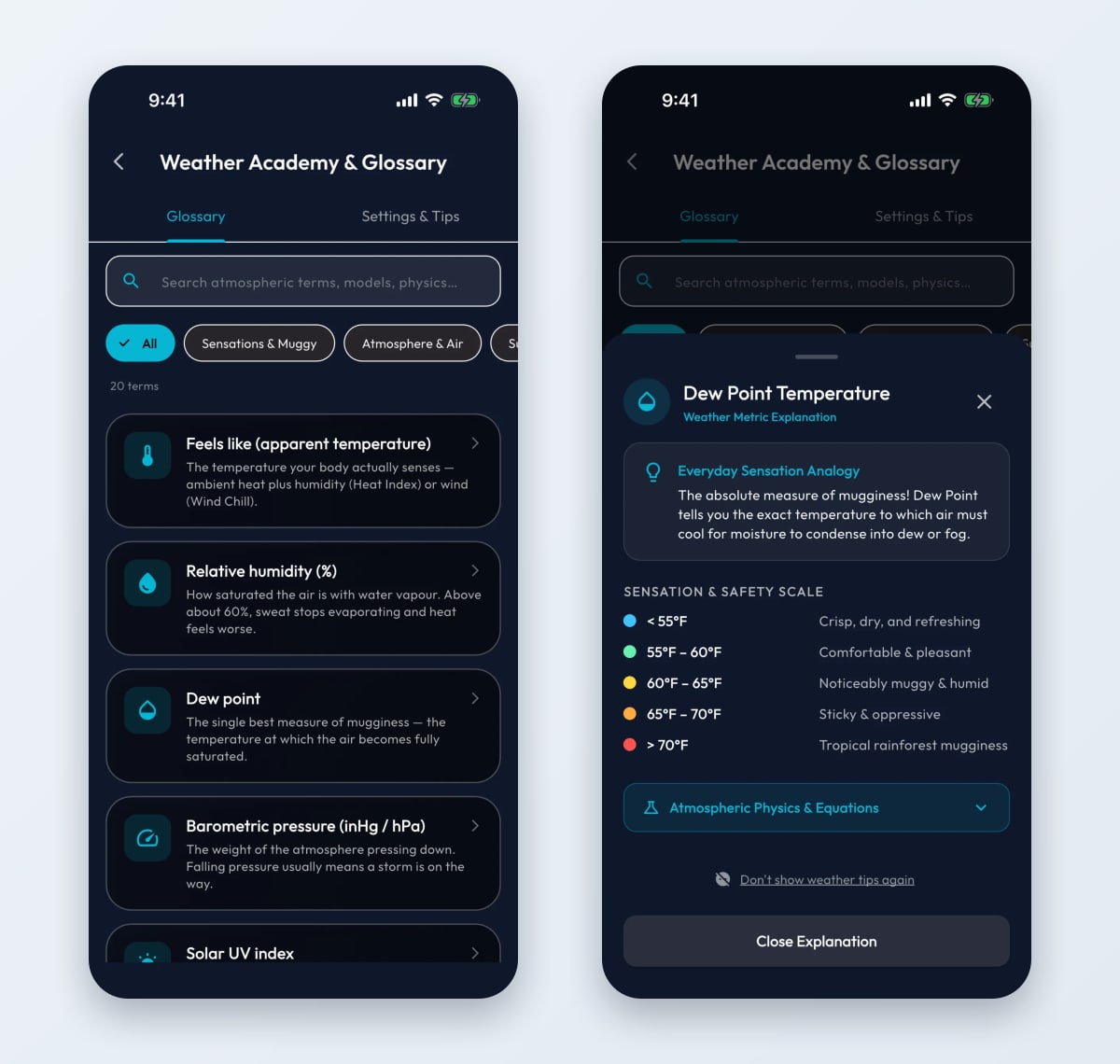
Every tile on the dashboard has an information button, and this is the part I enjoyed most. Tap it and Sensecast explains the metric in three layers: an everyday analogy first, a sensation and safety scale second, and the actual physics third, folded away for anyone who wants it.
The dew point sheet is a good example. Relative humidity moves with the temperature and tells you very little on its own; dew point holds still and tells you how muggy it will actually feel. Sensecast shows it as a five-band scale, from crisp and dry below 55°F to tropical-rainforest mugginess above 70°F. After reading it once, you look at the humidity tile differently.
The academy is searchable and filtered by category, and the formulas behind the numbers (Steadman for feels-like temperature, Rothfusz for the heat index, Rayleigh scattering for the colour of the sky, the EPA breakpoints for air quality) are there for the curious. Once you know it all, the tooltips switch off entirely. That is a small, respectful touch.
The rest of it
- Migraine alerts (Pro): a push notification when barometric pressure falls 3 hPa or more in three hours, the drop that triggers sinus and inner-ear pressure for migraine and joint-pain sufferers.
- Air quality: PM2.5, PM10, ozone and nitrogen dioxide against EPA thresholds. In the US the headline figure comes from the nearest EPA AirNow monitoring station, a real reading rather than a model.
- Widgets: three home-screen sizes, all three iOS lock-screen shapes and a Live Activity in the Dynamic Island. On Android, the current temperature can sit in the status bar itself, plus a Quick Settings tile.
- Aurora: the geomagnetic Kp index with the latitude band where it is visible, so you know whether tonight is worth the drive north.
- Every unit on Earth: °F, °C or K; wind in mph, km/h, knots, m/s or Beaufort; pressure in six units.
- A bad connection is handled: every forecast is cached, so a dropped signal shows the last good reading, and a built-in diagnostics screen tests each weather service separately if something is genuinely wrong.
Privacy deserves its own line. Location and preferences stay on the device, the forecasts come from public government open-data services, and no account is needed, so no profile is being built about you. For a free weather app, that is unusual.
Pricing
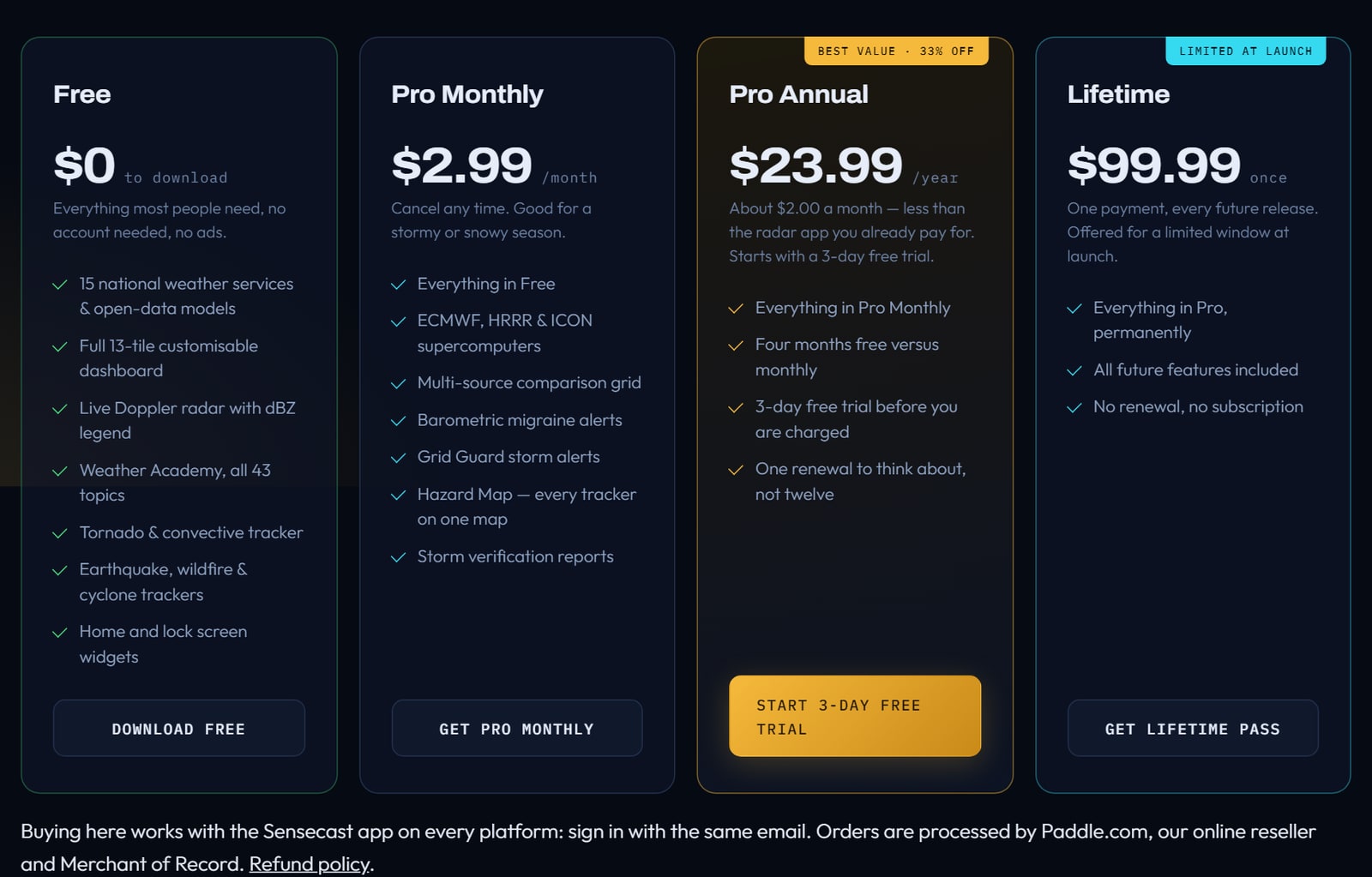
| Plan | Price | What it adds |
|---|---|---|
| Free | $0 | 15 forecast sources, the 13-tile dashboard, live radar, the Weather Academy, tornado, earthquake, wildfire and cyclone trackers, the outage card, widgets. No ads, no account. |
| Pro Monthly | $2.99 a month | ECMWF, HRRR and ICON, the comparison grid, migraine alerts, Grid Guard, the Hazard Map, storm verification reports, Weather Wallpaper and widget themes |
| Pro Annual | $23.99 a year | Everything in Pro, about $2.00 a month, with a 3-day free trial |
| Lifetime | $99.99 once | Every Pro feature and every future release, offered for a limited window at launch |
You can buy inside the app through the App Store or Google Play, or on sensecast.app, where Paddle handles the payment and any purchase can be refunded for any reason within 14 days. For a storm season, the monthly plan is a sensible way to try Pro; for a year-round weather watcher, the annual plan is the better deal.
What to know before you install
A few things worth setting expectations around, because I would rather you hear them from me than discover them yourself.
The hazard layer is deepest in the US. The forecast works worldwide, and it is genuinely good at routing to the right national service. But some of the most distinctive feeds are American by nature: Storm Prediction Center tornado reports, Department of Energy outage counts and EPA AirNow stations. If you live outside the US, you get the forecasts, the radar, the academy, earthquakes, fires and cyclones, and less of the grid layer.
It relays official warnings; it is not the official source. Sensecast says so itself in its FAQ: in an emergency, follow your national weather service and local emergency management. That is the honest position for any third-party weather app.
It is new, and that cuts both ways. Sensecast launched at the end of September, so it has not yet built up the store ratings of the incumbents. On the other side, it is changing fast (version 1.1.0 added the Hazard Map two weeks after launch), and you are dealing with the person who builds it: support is a real inbox, and most messages get an answer within two or three days.
It is built for people who want the detail. If a glance at the temperature is all you ever need, the weather app already on your phone does that for free. Sensecast is for the moment you ask which forecast to trust, why it feels so muggy, or whether your power is about to go.
The verdict
Sensecast does three things most weather apps do not even attempt: it is honest about where the forecast comes from, it watches the hazards that actually reach your house, and it teaches you what you are looking at without ever talking down to you.
The free version is a complete, ad-free app that most people will never need to pay for. Pro is priced like a coffee a month and adds the tools that matter when the weather turns serious: the supercomputer models, the outage alerts, the Hazard Map and a storm report you can hand to an insurer.
For storm watchers and anyone in a part of the US that loses power every winter, it is worth installing today. For the curious, the Weather Academy alone will change how you read a forecast. Start with the free version and see whether you ever go back.
Website: sensecast.app · Get it: App Store · Google Play
Frequently asked questions
Is Sensecast free?
Yes. The free version is the full app: 15 forecast sources, the customisable dashboard, live radar, the Weather Academy, the tornado, earthquake, wildfire and cyclone trackers, and home and lock-screen widgets, with no ads and no account. Sensecast Pro is an optional upgrade at $2.99 a month, $23.99 a year with a 3-day free trial, or $99.99 once for a Lifetime Pass offered at launch.
What does Sensecast Pro add?
The three flagship supercomputer models (ECMWF IFS, NOAA HRRR and DWD ICON), a side-by-side comparison grid, barometric pressure migraine alerts, Grid Guard power outage alerts, the Hazard Map, storm verification reports for insurance claims, Weather Wallpaper, widget colour themes and extra sky themes.
Where does Sensecast get its forecasts?
From official open-data services such as NOAA and the National Weather Service, MET Norway, DWD, Météo-France, the UK Met Office, JMA and Environment Canada. It routes to the service that models your location by default, names the source on the dashboard, and lets you switch or compare sources.
Does Sensecast work outside the US?
Yes. Forecasts, radar and the academy work worldwide, and the app routes to the national weather service for your area. Some hazard feeds are US-only by nature: Storm Prediction Center tornado reports, Department of Energy outage counts and EPA AirNow air-quality readings.
What is a storm verification report?
A Pro report for a chosen date and time at your location, for any date in the past two years. It includes the modelled peak gust, wind, rain and pressure, the nearest airport station's measured gust, the warnings in effect and the outage status, with a reference ID anyone can check at sensecast.app/verify. It is supporting documentation for property and solar claims, not a professional loss adjustment.
Do I need an account to use Sensecast?
No. Forecasts, radar, trackers, widgets and the academy all work without an account, and your location and preferences stay on the device. An optional account only links a purchase made on the website to the app.
Which devices does Sensecast run on?
iPhone and iPad (iOS 15 or later), Android, and Mac through the Mac App Store. Windows and Linux builds are on the way, and a web version is planned.
Who makes Sensecast?
Greigh Studios LLC, an independent one-person studio in Michigan, United States. Daniel Hipskind designs and builds the app and answers support himself at the address on the Sensecast website.
Free tools mentioned in this article
No account, no credit card. Built for founders doing their own SEO.
Ask AI about this article
Open your assistant with the article preloaded: key takeaways and next steps.